

Ask it
Which version of yourself is this machine running, and what changed in the last one? Say it in plain English — I do not read code.That question, asked on the machine these pages were written against, came back with this (trimmed; it also named the commit and the time it was published):
What the last update added: a new automatic helper called the mailer — essentially an email butler. In plain terms:For context, the update before that added the notes tool (the ability to write, read, and list notes by topic that stick around between conversations), and before that a fix so the Telegram bot reads its secret token when needed rather than once at startup.
- It keeps an eye on this machine’s email inbox, checking roughly every 20 seconds.
- When a new message arrives, it hands it to an assistant (the “Responder”), which figures out an appropriate reply — and if the message asks it to actually do something or look something up, it has the tools to do so before answering.
- It sends that reply back to whoever wrote in.
- Every message it handles gets written down as one line in a simple human-readable log file, so you can see later what came in and what was answered.
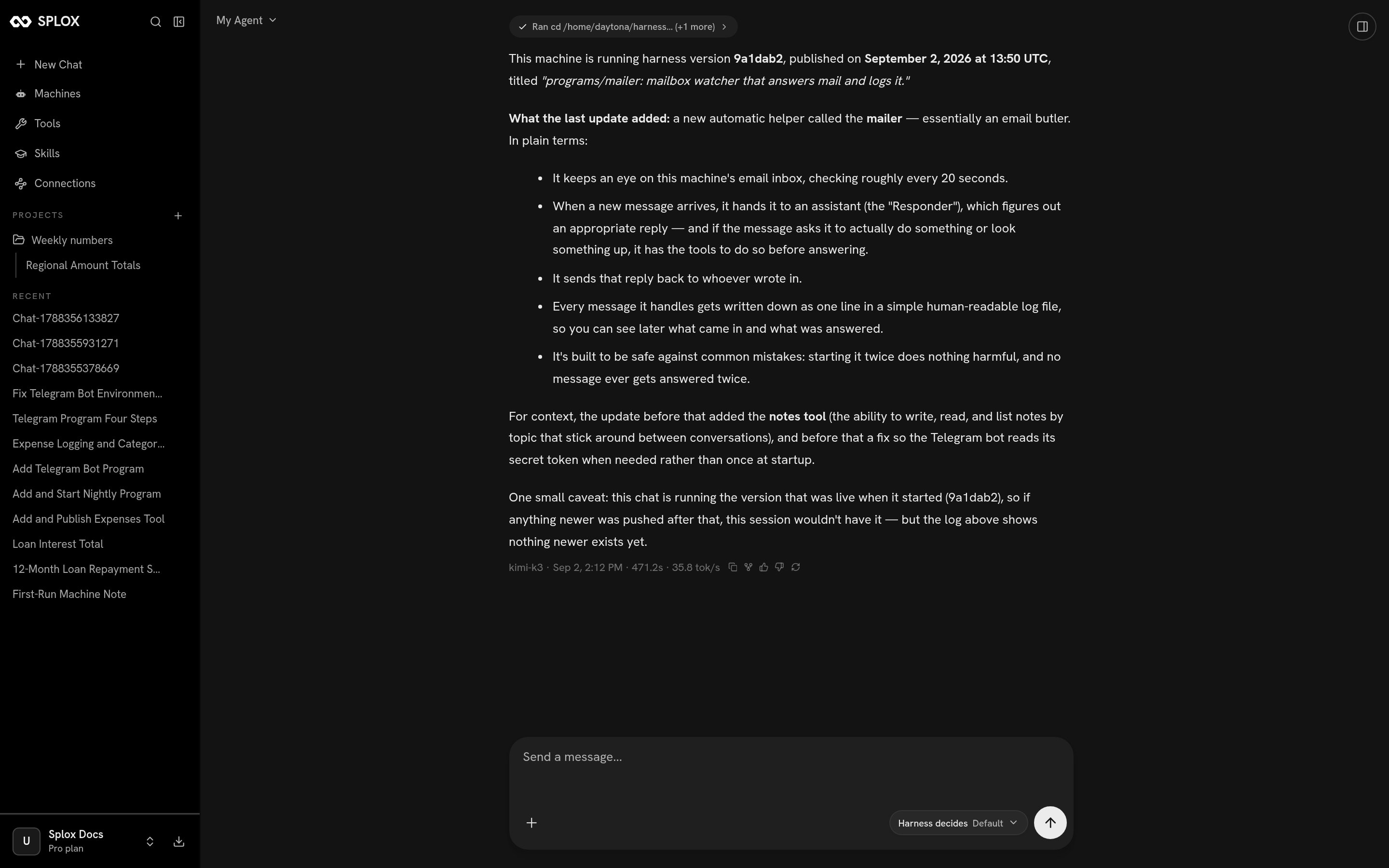
The same answer in the chat. It opened its own history to write it — the chip at the top is the command it ran.
- What have you changed about yourself today?
- What did version 5 change, and what does it mean for what you do?
- Show me the last five versions with one line each.
- Was that always true, or did you change it?
What a version is
Everything about your agent at one moment: its prompt, its model, its tools, the programs it runs, the rules it works under. Numbered from 1. The list only grows — publishing again never edits or replaces an earlier one. This is the real history of an ordinary account that was set up in the morning and asked for a handful of things during the day:
Version 1 is always the same shape and is worth understanding: an agent never
starts empty, so version 1 is the day it was copied from a
starter, and that line is the only record of where it came
from. Everything after it is somebody asking for something.
Read the same list yourself with one request:
Which version this machine is running
Three answers, and they are not the same answer. Ask. The fastest, and the only one that also tells you what is in it. The Machines screen. The card under your machine’s name readsRuns My Agent @ main. main means the latest published version — the machine
does not sit on a number, it follows the harness, and picks up each publish on
its next chat. See Machines.
The run record, if you need to be exact. Every run writes down the precise
tree it executed, so a conversation from last week is readable at the version it
actually ran:
There is a gap those answers can disagree across, and the screenshot above is
sitting in it. Your agent edits its files on the machine and only publishes
when the change is worth keeping, so between an edit and a publish the machine is
running something no version number names — which is why the answer above names a
commit,
9a1dab2, rather than a number: at that moment the checkout was one
unpublished change ahead of version 6. The gap is deliberate, and it is what lets
you try a change in one message and keep talking. Ask for the change to be
published and it closes.Who changed it, and why
Why is the message on the version — the line in the table above. Those lines are written by your agent when it publishes, which is why they read like a changelog rather than likeupdate main.py.
Who is your agent, publishing on your behalf. Under the covers the author is
whatever name it committed under — splox <[email protected]> for most of the
list above, assistant <[email protected]> for one of them — and none of
those are separate people. If more than one person can talk to this agent, the
version message is where you say so; ask for it: “when you publish, say who
asked for the change.”
Reading a change without reading code
Do not open the diff. Ask two questions about it instead:What did version 5 change?
What will you do differently because of it?The second one is the one that matters, and it is the one a diff does not answer. The change behind version 5 above is one file, twenty lines added and nine removed — unreadable if you do not write Python, and completely readable as “the Telegram bot used to break at startup if it could not see its token; now it reads it when it sends a message.” If you want to see the change itself, it is there — the diff, the file, the tree of any version — and VS Code and SSH is how you look. But asking is not a lesser way of reading it.
Going back
Say it in the chat, naming the change rather than a number if that is easier:Go back to how you were before the ledger.
That last change was wrong. Undo it and publish.What happens: your agent publishes a new version whose contents are the old one. Going back is a step forward in the list. That is version 7 in the table above — somebody asked “take the expenses tool back out of my agent and publish that”, and what the history recorded was:
- Files. Everything the agent wrote to the machine stays written; a rollback changes who the agent is, not what it did. See Files.
- Programs already running. A bot or a nightly job keeps running the code it was started with until somebody restarts it. Ask for that too.
What going back does to a conversation in flight
Going back on one machine only
If the change is right in general and wrong here — you want to reproduce something, or hold one machine still while the other moves on — a machine can be pointed at an older version instead. Nothing is published and no other machine moves:harness_ref puts it back on main. Ask for it in words —
“pin this machine to version 4 and leave the rest alone” — and your agent makes
that call.
The exact shape of it
For an agent reading this page, and for anyone who wants the mechanism rather than the gesture. A harness is a git repository, and the version history is git’s:git push origin main from the checkout — the push is the publish, it goes through the
platform’s gate, and a tree that is not a valid harness is refused with every
problem named at once. Publishing a version is the full
reference; Troubleshooting quotes the refusals.
What the agent runs when you ask it to go back
What the agent runs when you ask it to go back
Both of these end in a push, which is what makes the new version. Neither is
something you have to type.
read-tree -u --reset sets the working tree to that exact tree and leaves HEAD
where it is, so the commit that follows is a new version whose contents are
byte-for-byte version 4’s. That is the mechanism behind “the list only grows”.When a change makes it worse
Spotting it, saying it, and when to start a fresh machine instead.
What is on the machine
The files a version is made of, and which one your request touched.