

”Be shorter”
git status in the checkout was clean. The agent read that as an instruction for
the conversation and simply followed it — which is right, and which lasts exactly
as long as this chat.
What the agent edits when you do say that is its own prompt — the file its
declaration reads at the start of every run. The edit lands on the very next
message in this chat, with nothing published in between, because the platform
asks the harness who the agent is at the moment it needs to know. The publish is
what carries it to new chats.
The same shape covers most of what people mean by “behave differently”:
The starter prompt already leans this way — “Prefer doing over asking: pick a
sensible default and go, and come back for a decision only when getting it wrong
would cost something that cannot be undone.” If your agent is asking you too
much anyway, the useful ask names the case: “stop asking me before you run shell
commands” is actionable in a way that “be more autonomous” is not.
”Use a cheaper model when we are only chatting”
Two different things wear this sentence, and it is worth knowing which one you want.For this conversation only
The chip in the composer. It reads Harness decides · Default until you touch it.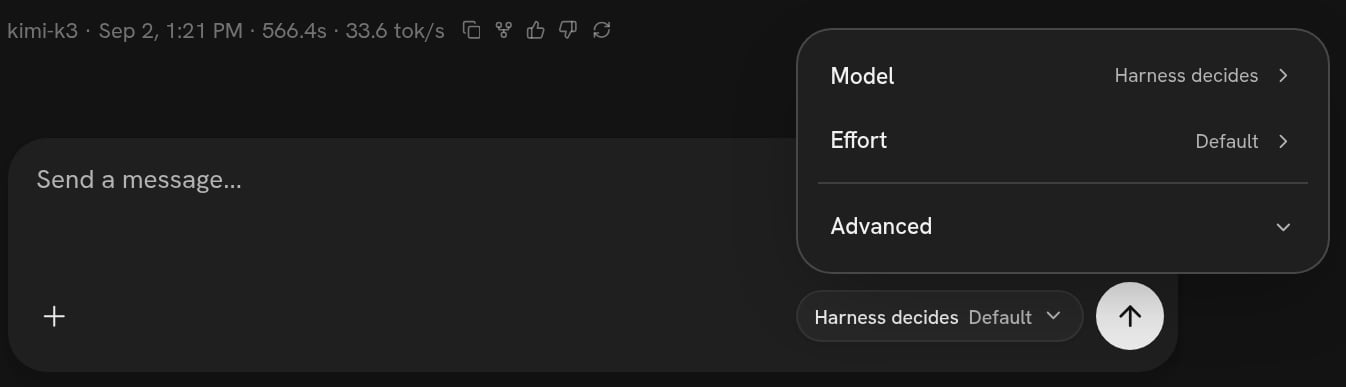
The composer chip: Model, Effort, and the endpoint under Advanced
- Model — Harness decides means whatever your agent declares. Pick one and it overrides the harness for this chat.
- Effort — how hard the model thinks before it answers, on a ladder of Off, Low, Medium, High and Max.
- Advanced → Endpoint — whose credential answers: the platform’s, or one of your own from Connections.
As a rule, every time
”Check your work before you answer”
Assistant that talks to you and an
Executor it can hand a self-contained job to. Asking for review makes the
second one a reviewer.
The other shape is a rule at the point where the loop decides the turn is over:
that point can send the model back around with a follow-up instead of letting the
answer out. It is the right one when “check it” should apply to every answer
rather than to the ones the agent remembers to check.
Which you get depends on what you asked for, and it is worth asking which you
got, because they cost differently: a sub-agent review is a second run with its
own bill; a rule at the end of the turn is another pass of the same one.
What it costs, and what it cannot do
Every one of these is a run. A prompt edit is a minute or two; a rule the agent has to write and test is longer. The exposure is the same as any other ask: the previous version is still in the list. A prompt is not a guarantee. “Never delete anything” in a prompt is a strong suggestion, not a lock. If you need it to be a lock, ask for it as a rule at the point where tool calls are approved — that point sees every call by name with its arguments before it runs and can refuse it. Say which one you want: “I want this enforced, not just asked for” is a sentence the agent understands. Some things are per chat and cannot be a rule. The model chip and the effort setting are conversation-level overrides. If you want them every time, they have to be in the harness.How to check a rule actually fired
The answer being different is the first check. The second is that every run keeps a record of which of your rules ran and what each decided:use_default means the file was reached and chose not to
decide — which is exactly what a rule that is not firing looks like, and exactly
what a rule with a typo in it looks like too.
The third check is the version list: a rule that is not in it was not published,
so it is not there in a new chat. See Versions.
Undoing
If the agent has become bad enough that asking it to fix itself is not working —
it will not stop apologising, or it now refuses ordinary work — do not keep
asking. Pin the machine to an older version instead:
When it goes wrong.
Which model to reach for
What the models on this platform are good at, and what effort changes.
The reference your agent reads
The ten points of a turn, exactly. Hand your agent this URL when you want a
rule at a specific point.