

What the agent did about it
-
Found the address. Your agent has an email address of its own, from the
platform’s email package — it did not need one from me. It printed it:
[email protected]. -
Read its own repository first —
PROGRAMS.md,AGENTS.md, and the two programs already there — before writing anything. -
Wrote a program: a poll loop, a
Butleragent for composing the reply, a prompt file, a state file and a README. -
Started it with the ordinary command anybody would use for a background
script, so it outlives the turn:
- Changed its own design mid-run. Its first version had the agent send the mail itself; it decided the loop should send it instead, in its own words, “that way the ‘reply only to the sender’ rule is enforced in code, not by prompt obedience,” and restructured.
programs/mailbutler/main.py, as the agent wrote it
programs/mailbutler/main.py, as the agent wrote it
~/harness/programs/mailbutler/main.py.What it needs from you
Exactly one thing, and which one depends on how the outside world reaches in.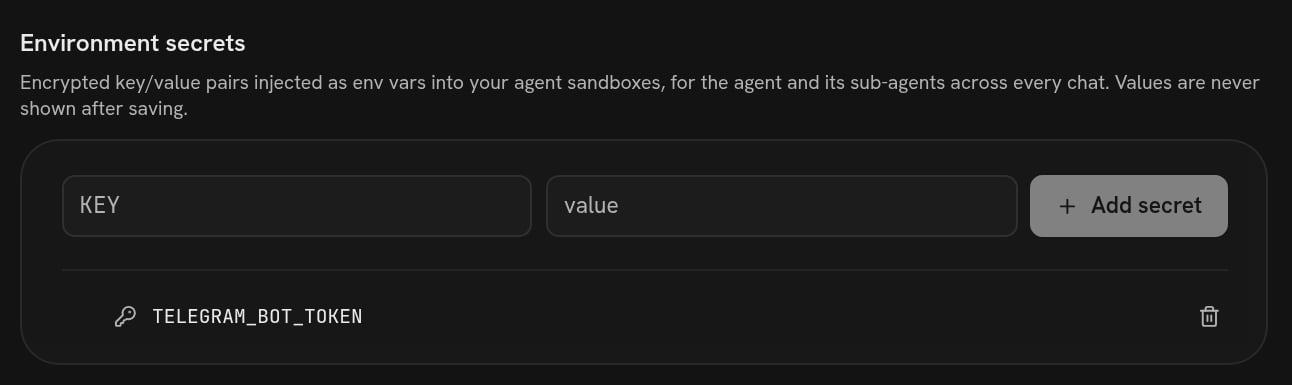
Connections → Secrets: a token the agent's own code reads from the environment. The value is never shown again.
os.environ["TELEGRAM_BOT_TOKEN"] and nothing writes a token into a file in git.
The webhook case is worth being blunt about: your machine is not addressable from
the internet, so “let Stripe call you” is not something the agent can arrange on
its own. What it can do is poll — an API, a mailbox, a repository — on a timer,
which is On a schedule.
What running forever means
A program started in a chat belongs to the machine, not to the run and not to the conversation. It keeps going after the turn ends, after the chat ends, and into tomorrow. It stops in exactly two ways from outside: somebody presses Stop on the machine, or the plan behind the account stops keeping machines running. Nothing reaps it on a schedule, and no conversation ending takes it down. On a paid plan the machine’s live state carries no idle timeout at all; on a free plan it stops itself after 30 minutes with nothing touching it, and the program stops with it. See Machine. It can also stop on its own, by crashing. That is what the loop above is defending against with itstry around the poll — an exception writes a line to
the log and the loop sleeps and tries again, instead of the watcher quietly
disappearing.
So the sentence worth adding to the ask is: “make restarting it harmless.”
The agent that wrote the mail butler did it unasked — a state file with a
watermark and the keys of everything already answered, so a restart answers
nothing twice, and a lockfile so starting it a second time exits instead of
double-replying. Starting it again while it was already up printed exactly that
and stopped:
Starting a program is not publishing it. The code goes into the harness and
becomes a version; the running process is on this machine only. If you move to
another machine, or restart this one, somebody has to start it again — which is
one sentence in a chat, and a reasonable thing to ask the agent to check for at
the top of a conversation.
Checking it
Three checks, cheapest first. Ask. “Is the mail watcher running?” The agent looks and tells you. It is oneps on its own machine.
Read the log. The program the agent wrote logs both sides of every exchange
to /home/daytona/mailbutler.log, and it says so in its own README:
524 from
the platform’s own tool endpoint; the loop caught it, wrote the line, and slept
instead of dying. A watcher without a log is a watcher you cannot answer any
question about, so “keep a log I can read” is worth putting in the original ask.
Use it from outside. Mail the address; message the bot. This is the only check
that tests the whole path, and it is the one to do before you rely on it.
The agent’s runs are visible too. Every time the loop hands a message to its
agent, that is a real run: it shows up in your chat list with its whole
conversation, and it is billed like any other. The program’s log says what came
in; the run says what the agent thought about it.
Stopping it, and undoing it
Two separate things.
Going back to before the change is the same as any other rollback — a version
carries the program, so undoing the version undoes the program.
Versions is that page.
On a schedule
The same shape, triggered by the calendar instead of by a message.
A Telegram bot, end to end
The whole conversation, including the token trap as it actually happened.