

What the agent did about it
That run took 9 minutes and 15 tool calls. In order:- Read its own repository. It opened
TOOLS.mdin the checkout, listedtools/, and read both files already there —expenses.pyandfiles.py— to see the shape a tool of this harness has. - Looked at where the data would go. It found
~/notesalready in use by ad-hoc work in the sandbox and deliberately did not reuse it, putting the store in~/.notesinstead so nothing but the tool writes there. - Wrote
tools/notes.py— three functions, with the docstrings that become what the model is told about them. - Added the file to its own declaration. One line in
programs/splox/main.pychanged fromtools=["system:compute", "tools/files.py", "tools/expenses.py"]to the same list with"tools/notes.py"on the end. A tool that exists in the tree but is not named by an agent reaches nobody. - Ran it before telling me. It loaded the file the way the platform’s own
loader does and exercised nine cases: write, overwrite, append, a messy
subject, read-back, listing, the missing-subject error text, an empty subject,
and
../../etc/passwdas a subject. - Committed and pushed, which is what publishing is.
tools/notes.py, as the agent wrote it
tools/notes.py, as the agent wrote it
How you see it afterwards
In the next message. The tool is offered by name, and the transcript shows it being called instead of a shell command: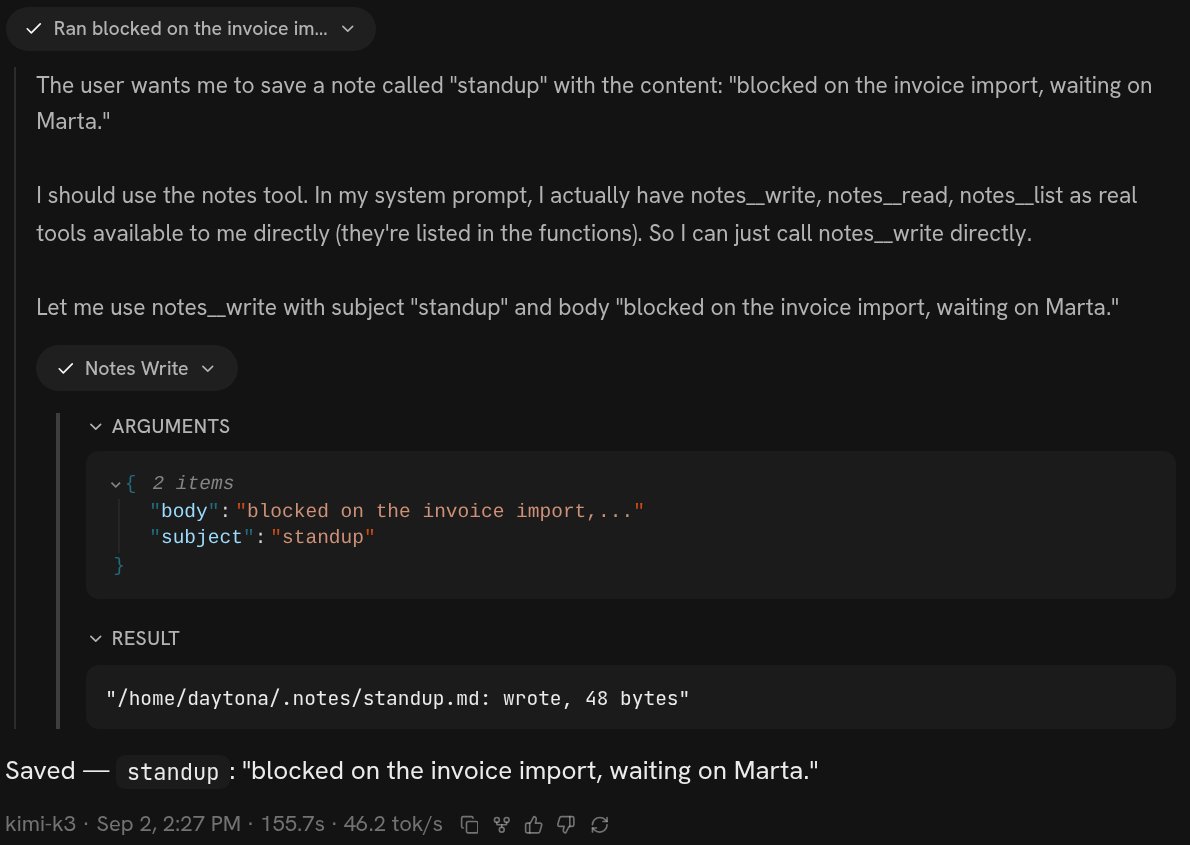
The turn after the tool was published: one call to notes__write with its arguments and result, not a shell script
{"subject": "standup", "body": "blocked on the invoice import…"} in, and
"/home/daytona/.notes/standup.md: wrote, 48 bytes" out. Underneath, the whole
answer is one line.
The real name is the file and the function joined by two underscores, which is
why tools/notes.py holding write is notes__write. You never choose that; it
falls out of where the agent put the code.
In the version list. Add notes tool: write/read/list notes by subject in ~/.notes is version 6 of that harness, and it stays there. See
Versions.
In the file, if you want to look. ~/harness/tools/notes.py on the machine,
readable in VS Code or over SSH without changing anything —
VS Code and SSH.
What to say
- Name the outcome and the calls, not the code. “One call that writes a note
under a subject, one that reads it back” is a specification. “Write a Python
file with a
write(subject, body)function” is you doing the agent’s job badly. - Say where the data lives if you care. The agent will choose otherwise, and it will choose reasonably, but it is your disk.
- Say what it must not do. “Never delete a note”, “read-only, it must not write anywhere” — a refusal is easier to build in at the start than to add after something is gone.
- Say “publish it when it works.” Otherwise the tool exists on this machine and in this conversation only, and a new chat will not have it.
- Ask it to test it. Most of the time it will anyway. When it does not, the first you hear of a broken tool is the next time you need it.
Changing it, and taking it away
All three are asks, and they land at different moments.What it costs to be wrong
One run. The notes tool was 9 minutes and $0.37 against that account’s usage, and that is the whole exposure. Nothing else on the account changed until the push, and any run already going kept the version it started on. A broken tool file cannot be published. The publish gate imports every file intools/ and refuses the push in the interpreter’s own words if one does not
import. A push that is refused changes nothing.
A vague description is the failure mode that hides. The model is shown three
things about a tool — the name, the first line of the docstring, and the argument
types — and nothing else. A tool described as “handles notes” gets skipped in
favour of a shell command, and nothing about the run tells you that is what
happened. If a tool you asked for is never used, ask what its description says.
Your files are not versioned. The code is in git; what the tool writes is
just on the disk. A tool that rewrites or deletes data is the one ask where being
wrong costs more than a run, so say the constraint out loud.
A tool of your harness is not the only kind your agent has. The platform’s own
packages — a shell, a browser, search, email, media, SMS — are there in every run
without you asking for anything; see Tools. Asking for a tool
is worth it when you want a narrower thing with a name and a docstring, which
is most of the time. The mechanism, for an agent reading this page, is
Tools.
Connect a service instead
When the capability you want already exists behind somebody’s login.
Check what changed
Which version your machine runs, what the last one did, and how to go back.