

Tool Edges
Purpose: Connect Agent nodes to Tool nodes for AI tool calling Tool edges are special connections that make tools available to Agent nodes. When an Agent is connected to Tool nodes via tool edges, those tools become part of the Agent’s available function set.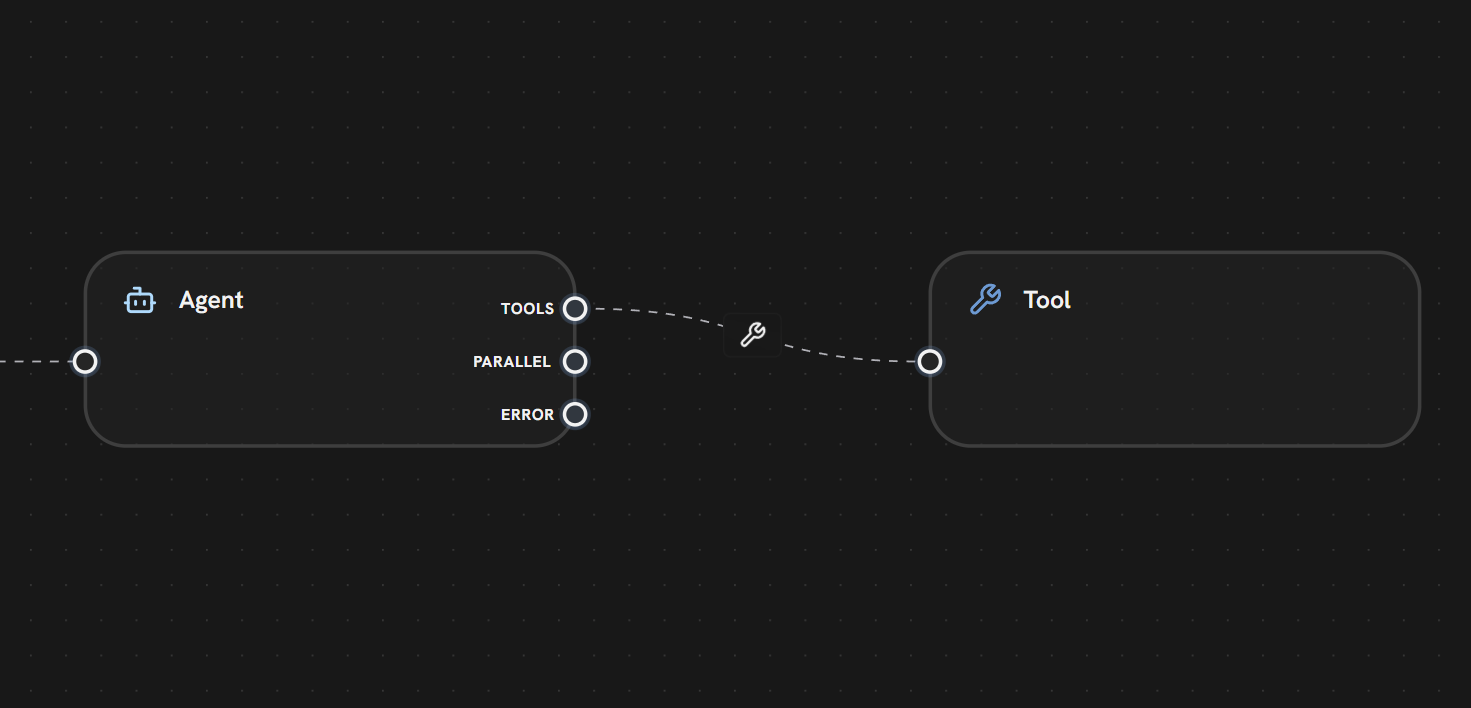 In this example:
- The Agent Node has a TOOLS output handle
- A tool edge (dashed line with 🔧 wrench icon) connects to the Tool Node
- The tool becomes available to the Agent for function calling
- The Agent can decide when and how to use this tool during its iteration loop
- PARALLEL — For standard execution flow (to downstream nodes)
- ERROR — For error handling
1
Connection
Connect Tool nodes to an Agent node’s TOOLS handle using tool edges
2
Discovery
The Agent automatically discovers all connected tools at the start of its loop
3
Decision
During execution, the LLM decides which tools to call based on the conversation
4
Execution
Tools execute and return results to the Agent
5
Iteration
The Agent can call tools multiple times before producing a final response
- Icon: 🔧 Wrench
- Label: Tool name or icon
- Connection: From Agent’s TOOLS handle to Tool node’s input
- Search Knowledge Base — Find help articles
- Check Order Status — Query order database
- Create Ticket — Generate support ticket
Tool edges are not execution edges — they don’t trigger node execution directly. They only define which tools are available to the Agent. The Agent handles tool execution internally during its iteration loop.
What’s Next?
Agent Node
Learn how Agents use tools in their iteration loop
Tool Node
Explore available tool types and MCP servers
Parallel Edges
Standard execution flow between nodes