

What you need
An API key. There is no key screen in the app: you mint one with your browser session, and it needs a paid plan.The script
Standard library only, so there is nothing to install and nothing to blame.Run it
errors.on is the harness’s own error hook catching it
and saying retry; the run went back to running (14), was asked again (15–17),
answered with text (18), and that answer became the run’s output (19).
Nothing in your code has to know about that retry, which is why you follow
run.status_changed rather than counting events.
The three things this page is really about
A run happens on a machine.machine_id is required, and it is not
politeness: the filesystem the agent writes to and the shell it opens belong to a
machine, and the platform will not guess which one. Leave it out and you get
GET /v1/machines is the only machine
listing there is and it answers with raw uuids; POST /v2/runs wants the m_…
form and refuses a uuid. The encoding is not a lookup — it is the same 128 bits in
Crockford base32 — which is why four lines of public_id are the whole
conversion. With the Python SDK installed, splox.encode_id("m", uuid) does the
same thing.
The stream is a journal, not a firehose. Every event has a sequence and a
cursor, and the same endpoint serves the same events as JSON pages. If the
connection drops, hand the last cursor back as Last-Event-ID and continue where
you were — worth having, because a dropped SSE connection is the normal failure
of this endpoint. Streaming.
Where the run went
It is a chat, on the same machine, with the same history as anything typed into the app — open/c/<chat uuid> and it is all there:
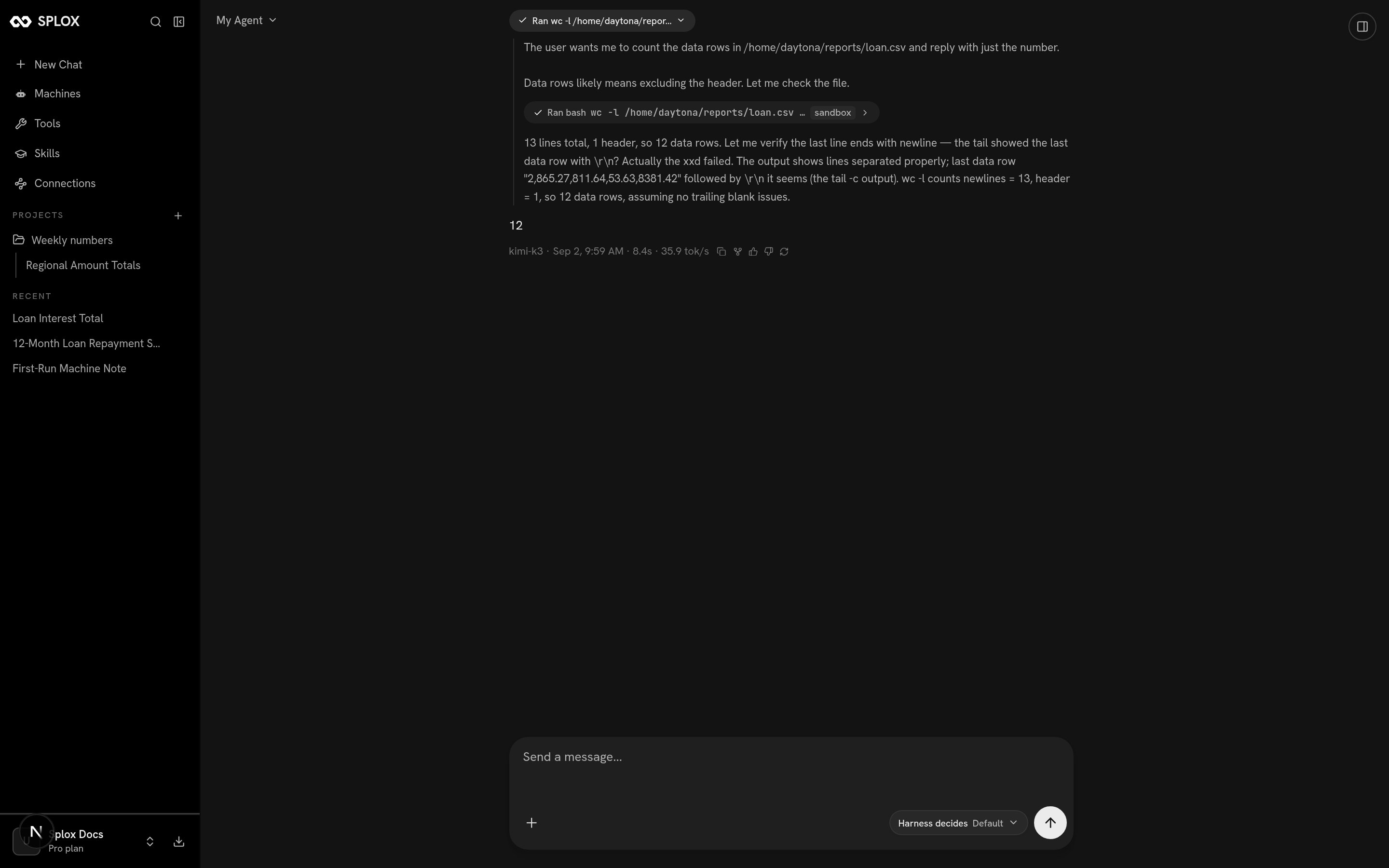
The run this script created, opened in the app: one tool call, one answer
The URL takes the chat’s uuid, while the API answers with
chat_01M1G…. They are
the same value in two encodings — decode the base32 back to a uuid and the page
opens. A chat created this way is not listed in the sidebar’s Recent, which
only shows chats a person started. If your system creates runs, keep the ids: it
is the only way back to them from the app.Continuing the conversation
Passchat_id on the next create and the run joins that chat instead of starting
one — same machine, same history, so a follow-up that only makes sense in context
works:
Next
The Runs API
Every field of a run, its messages, its tree of sub-agent runs, cancelling, and listing.
Errors
The problem shape, the codes, and which failures are worth retrying.