> ## Documentation Index
> Fetch the complete documentation index at: https://docs.splox.io/llms.txt
> Use this file to discover all available pages before exploring further.
# Drive a run from your own code
> For a system that has to start runs on its own: create one over HTTP, follow its events, read what it produced
Every other page here is a conversation: you ask, the agent works, you check.
This one is different, and it is the only one that is. It is for the case where
**something other than a person starts the run** — your backend, a webhook, a CI
job, a cron on a server you own — and there is nobody there to type.
You will need an API key, and you will be reading HTTP. If what you actually want
is a job that runs on a schedule, or a bot that answers messages, you do not need
any of this: that lives in your harness as a
[program](/tutorials/nightly-job), and you get it by asking.
**No published SDK can create a run today.** The API requires `machine_id`, and
Python `0.5.4`, Node `0.5.4` and Go `v2.0.0` all omit it — `runs.create` answers
`422 validation_failed` with `/machine_id: machine_id is required`. Every other
call in all three works. Until they ship it, create runs over raw HTTP as below.
See [Runs](/api/runs).
## What you need
An API key. There is no key screen in the app: you mint one with your browser
session, and it needs a paid plan.
```bash theme={null}
curl -s -X POST "https://splox.io/api/v1/api-tokens" \
-H "Cookie: session=$SESSION" \
-H "Content-Type: application/json" \
-d '{"name": "run-script", "duration_minutes": 240}'
```
```json theme={null}
{
"token": "",
"name": "run-script",
"expires_at": "2026-09-02T17:25:09Z",
"expires_in": 14400,
"scope": "api",
"endpoint": "https://splox.io/api/v1/chat/completions",
"rate_limit": "10 requests per second",
"max_concurrent_requests": 10
}
```
```bash theme={null}
export SPLOX_HOST=https://splox.io
export SPLOX_API_KEY=
```
A key lives an hour unless `duration_minutes` says otherwise, up to a year, and
the plaintext is shown once. [API keys](/account/api-keys).
Check it before building on it:
```bash theme={null}
curl -s "$SPLOX_HOST/api/v2/harnesses" -H "Authorization: Bearer $SPLOX_API_KEY"
```
```json theme={null}
{"data":[{"id":"h_5V125BR7R4AA189NRYAB3DQC6D","name":"My Agent"}],"page":{"has_more":false,"next_cursor":null}}
```
## The script
Standard library only, so there is nothing to install and nothing to blame.
```python theme={null}
#!/usr/bin/env python3
"""Start a run on Splox, follow its events, and print what it produced."""
import json
import os
import urllib.request
import uuid
HOST = os.environ["SPLOX_HOST"]
KEY = os.environ["SPLOX_API_KEY"]
CROCKFORD = "0123456789ABCDEFGHJKMNPQRSTVWXYZ"
def public_id(prefix, raw):
"""v1 speaks uuids, v2 speaks m_… and h_…: same 128 bits, base32."""
n = int(uuid.UUID(raw))
return prefix + "_" + "".join(CROCKFORD[(n >> shift) & 31] for shift in range(125, -1, -5))
def call(method, path, body=None, headers=None):
data = json.dumps(body).encode() if body is not None else None
request = urllib.request.Request(
HOST + path,
data=data,
method=method,
headers={
"Authorization": f"Bearer {KEY}",
"Content-Type": "application/json",
"User-Agent": "splox-docs-example",
**(headers or {}),
},
)
with urllib.request.urlopen(request) as response:
return json.load(response)
# 1. Which machine, and which harness it runs. v1 is the only listing there is.
machine = call("GET", "/api/v1/machines")["machines"][0]
print(f"machine {machine['name']}: {machine['live']['state']}")
# 2. Start the run. machine_id is required, and it has to be the m_… form.
run = call(
"POST",
"/api/v2/runs",
{
"harness_id": public_id("h", machine["harness_id"]),
"machine_id": public_id("m", machine["id"]),
"input": {
"role": "user",
"content": [{"type": "text", "text": "Count the data rows in /home/daytona/reports/loan.csv and reply with just the number."}],
},
"metadata": {"source": "docs-tutorial"},
},
{"Idempotency-Key": str(uuid.uuid4())},
)
print(f"{run['id']} {run['status']} on {run['harness_commit'][:7]}, chat {run['chat_id']}")
# 3. Follow the journal until the run reaches a terminal status.
stream = urllib.request.Request(
f"{HOST}/api/v2/runs/{run['id']}/events",
headers={
"Authorization": f"Bearer {KEY}",
"Accept": "text/event-stream",
"User-Agent": "splox-docs-example",
},
)
with urllib.request.urlopen(stream) as events:
for line in events:
line = line.decode("utf-8").rstrip("\n")
if not line.startswith("data: "):
continue
event = json.loads(line[len("data: "):])
data = event["data"]
detail = data.get("hook") or data.get("role") or data.get("to") or data.get("name") or ""
print(f"{event['sequence']:3} {event['type']:20} {detail}")
if event["type"] == "run.status_changed" and data["to"] in ("succeeded", "failed", "cancelled"):
break
# 4. Read what it produced.
for output in call("GET", f"/api/v2/runs/{run['id']}/outputs")["data"]:
print(f"\n{output['name']}: {output['value']}")
usage = call("GET", f"/api/v2/runs/{run['id']}/usage")
print(f"{usage['total_tokens']} tokens, {usage['tool_calls']} tool calls, ${usage['amount']}")
```
## Run it
```bash theme={null}
python3 run.py
```
```text theme={null}
machine My Agent: running
run_01M1H69AS2FPJAVAGY535MWCVA queued on 2677a1a, chat chat_01M1H69ARCFRAV88TRJ756EKP1
1 run.created
2 run.status_changed running
3 message.created user
4 hook.called guard.on_input
5 hook.called context.build
6 hook.called model.choose
7 hook.called stop.done
8 message.created assistant
9 hook.called tools.before
10 message.created tool
11 hook.called context.build
12 hook.called model.choose
13 hook.called errors.on
14 run.status_changed running
15 hook.called context.build
16 hook.called model.choose
17 hook.called stop.done
18 message.created assistant
19 output.created final_message
20 run.status_changed succeeded
final_message: 12
18606 tokens, 1 tool calls, $0.032582
```
Read the middle of that list and the turn is visible: the model answers with a
tool call (8), the tool result comes back (10), the model is asked again — and at
13 the provider failed. `errors.on` is the harness's own error hook catching it
and saying retry; the run went back to `running` (14), was asked again (15–17),
answered with text (18), and that answer became the run's output (19).
Nothing in your code has to know about that retry, which is why you follow
`run.status_changed` rather than counting events.
Honesty about that run: the SSE connection dropped at event 16 while the stand
was having a bad afternoon, and the script fell over on the next request with a
`522`. The events above are the run's journal, read back afterwards from the same
endpoint as JSON pages — which is the point of the third section below. A script
you rely on hands the last `sequence` back as `Last-Event-ID` and continues
instead of dying.
## The three things this page is really about
**A run happens on a machine.** `machine_id` is required, and it is not
politeness: the filesystem the agent writes to and the shell it opens belong to a
machine, and the platform will not guess which one. Leave it out and you get
```json theme={null}
{
"type": "https://api.splox.com/problems/validation_failed",
"title": "Unprocessable Entity",
"status": 422,
"detail": "A run happens on a machine: name one, or continue a chat that is already on one.",
"code": "validation_failed",
"errors": [{"name": "/machine_id", "location": "body", "reason": "machine_id is required", "code": "required"}]
}
```
**v1 and v2 spell ids differently.** `GET /v1/machines` is the only machine
listing there is and it answers with raw uuids; `POST /v2/runs` wants the `m_…`
form and refuses a uuid. The encoding is not a lookup — it is the same 128 bits in
Crockford base32 — which is why four lines of `public_id` are the whole
conversion. With the Python SDK installed, `splox.encode_id("m", uuid)` does the
same thing.
**The stream is a journal, not a firehose.** Every event has a `sequence` and a
cursor, and the same endpoint serves the same events as JSON pages. If the
connection drops, hand the last cursor back as `Last-Event-ID` and continue where
you were — worth having, because a dropped SSE connection is the normal failure
of this endpoint. [Streaming](/api/streaming).
## Where the run went
It is a chat, on the same machine, with the same history as anything typed into
the app — open `/c/` and it is all there:
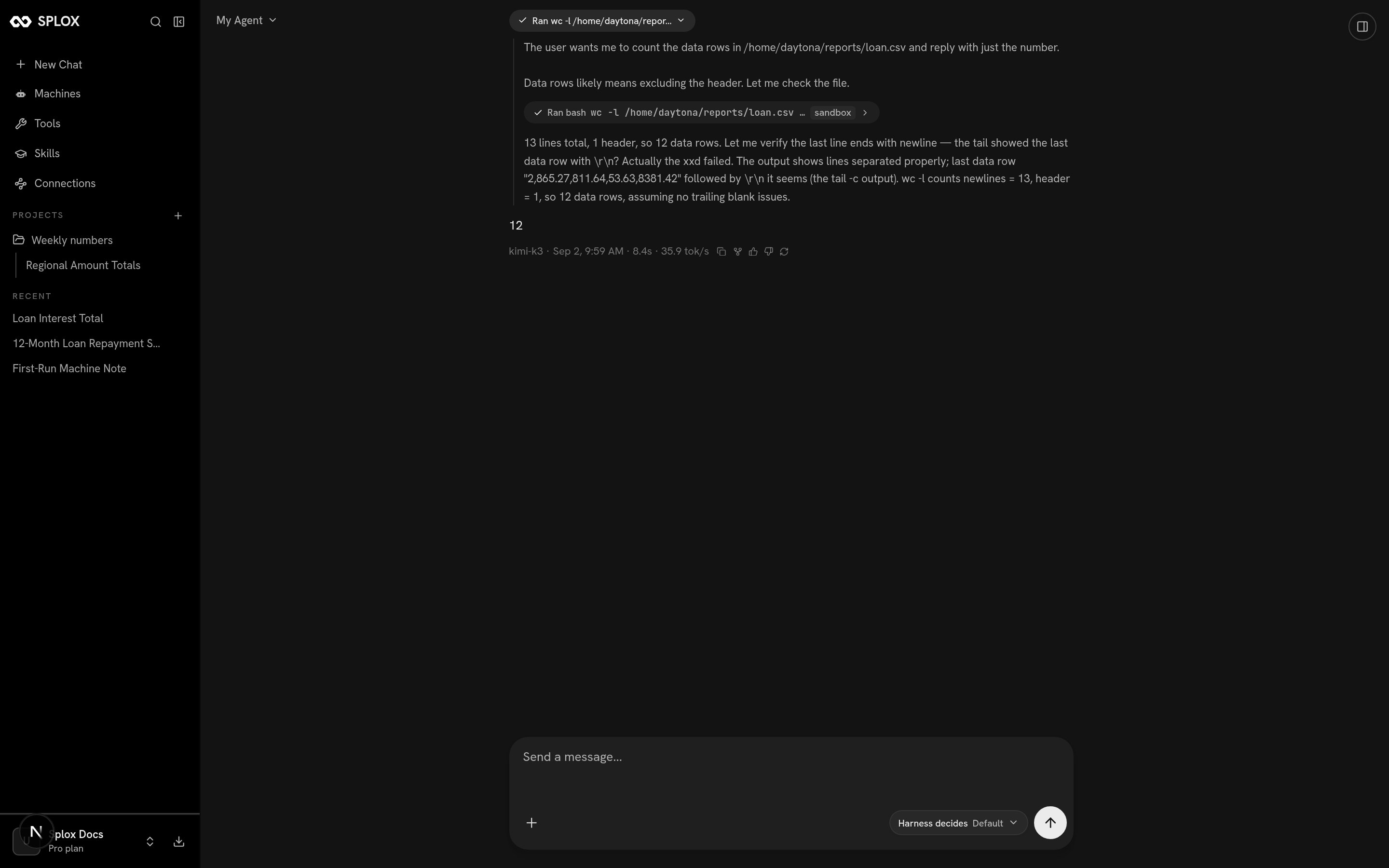 The URL takes the chat's uuid, while the API answers with `chat_01M1G…`. They are
the same value in two encodings — decode the base32 back to a uuid and the page
opens. A chat created this way is **not** listed in the sidebar's Recent, which
only shows chats a person started. If your system creates runs, keep the ids: it
is the only way back to them from the app.
## Continuing the conversation
Pass `chat_id` on the next create and the run joins that chat instead of starting
one — same machine, same history, so a follow-up that only makes sense in context
works:
```python theme={null}
run = call("POST", "/api/v2/runs", {
"harness_id": public_id("h", machine["harness_id"]),
"machine_id": public_id("m", machine["id"]),
"chat_id": run["chat_id"],
"input": {"role": "user", "content": [{"type": "text", "text": "And the header row — what are its columns?"}]},
}, {"Idempotency-Key": str(uuid.uuid4())})
```
## Next
Every field of a run, its messages, its tree of sub-agent runs, cancelling, and listing.
The problem shape, the codes, and which failures are worth retrying.
The URL takes the chat's uuid, while the API answers with `chat_01M1G…`. They are
the same value in two encodings — decode the base32 back to a uuid and the page
opens. A chat created this way is **not** listed in the sidebar's Recent, which
only shows chats a person started. If your system creates runs, keep the ids: it
is the only way back to them from the app.
## Continuing the conversation
Pass `chat_id` on the next create and the run joins that chat instead of starting
one — same machine, same history, so a follow-up that only makes sense in context
works:
```python theme={null}
run = call("POST", "/api/v2/runs", {
"harness_id": public_id("h", machine["harness_id"]),
"machine_id": public_id("m", machine["id"]),
"chat_id": run["chat_id"],
"input": {"role": "user", "content": [{"type": "text", "text": "And the header row — what are its columns?"}]},
}, {"Idempotency-Key": str(uuid.uuid4())})
```
## Next
Every field of a run, its messages, its tree of sub-agent runs, cancelling, and listing.
The problem shape, the codes, and which failures are worth retrying.