> ## Documentation Index
> Fetch the complete documentation index at: https://docs.splox.io/llms.txt
> Use this file to discover all available pages before exploring further.
# Tools
> The three ways a tool reaches your agent, and how the agent calls it
Your agent already has a shell, a browser, a search engine, an email address and a
phone number. This section says what each of those does, how to add more, and
where the credentials for the ones that need an account are kept.
A tool is a Python function. The agent calls it by writing code:
```python theme={null}
compute_exec(command="""python3 - <<'PY'
from tools.media import media_read_pdf
from tools.search import search
print(media_read_pdf("https://arxiv.org/pdf/1706.03762v7", pages="1"))
print(search("attention is all you need citations", max_results=3)["results"][0]["url"])
PY""")
```
Two tools, one round trip. Written as separate JSON tool calls that is four
messages through the model, each carrying the previous result back through the
context window. [Why the platform prefers code](/reference/tools) is worth reading
once; the rest of this section assumes it.
## The three ways a tool arrives
`system:compute`, `system:search`, `system:media` and the rest. The platform
runs them, credentials them and bills them. Nothing to install.
Something from [the catalog](/tools/catalog), or your own server by URL. It
gets a uuid, and that uuid is what an agent names.
`tools/notes.py` in your own repository. One file, one docstring, no publish
step to see it change. See [writing your own](/tools/custom).
All three end up as functions the agent calls, but they do not arrive by the same
road, and knowing which is which saves an afternoon.
A **platform package** is projected onto the machine as Python. One directory per
source, one file per tool:
```
~/tools/compute/compute_exec.py
~/tools/search/search.py
~/tools/media/media_read_pdf.py
~/tools//INDEX.md what the service is, and when to reach for it
~/tools/catalog.json what this machine was given
```
Each file is a plain function with type hints and a docstring, so the agent reads
the signature before the first call instead of guessing at it. `catalog.json` is
the platform's record of the same thing — the packages, the names inside them,
the keys of the [environment secrets](/tools/connections#environment-secrets) and
the models the machine may name:
```json theme={null}
{
"servers": [
{"key": "compute", "name": "Compute", "tools": ["compute_computer", "compute_download", "compute_edit", "..."]},
{"key": "search", "name": "Search", "tools": ["fetch", "search"]}
],
"env_secrets": ["TELEGRAM_BOT_TOKEN"]
}
```
A **file of your own** lives in the harness checkout at `~/harness/tools/`, and a
long-lived process in the sandbox imports it and answers the calls. Its tools are
offered to the model by name — `telegram.py` with a `notify` in it is the tool
`telegram__notify`.
An **MCP server** has no file anywhere. The platform holds the connection, calls
the server over the wire and attaches your credential on the way out; its tools
are offered to the model by their own slugs.
## How a tool is chosen for a turn
Three decisions, in this order.
**The agent's declaration** decides which sources exist for it at all. Each entry
in `tools=[…]` names a platform source, a file of your `tools/` tree, or the uuid
of a server you connected:
```python theme={null}
assistant = agent(
"Assistant",
system_prompt=prompt("assistant"),
model="kimi-k3",
provider="splox",
tools=["system:compute"],
)
```
That is the real declaration from the starter harness, and it names one source.
Everything else that agent uses — search, media, email — it reaches by importing
from `~/tools/` and running the code with `compute_exec`. An MCP server is the
exception: it has to be named in `tools`, because there is nothing on the machine
to import.
A `#` narrows an entry to particular tools:
`"system:compute#compute_read_file,compute_grep"` is those two and nothing else.
The full rules are in [Tools](/reference/tools#the-three-things-a-tools-entry-names).
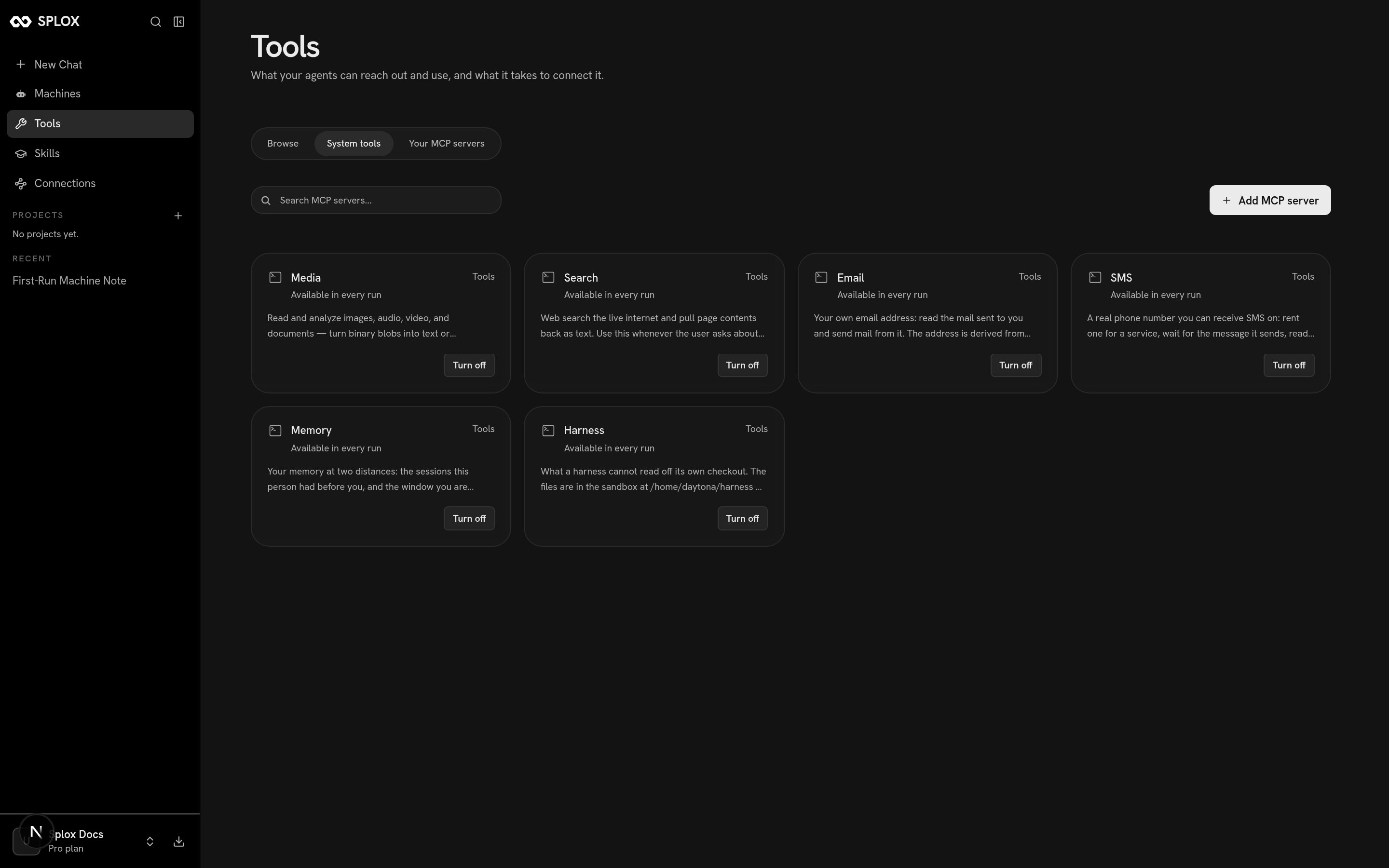
**The account** decides which platform packages exist for every agent on it. The
Tools screen lists them under **System tools**, each marked *Available in every
run* with a **Turn off** beside it:
 **`hooks/tools.py`** decides what a particular call may do. It sees the call by
name with its arguments before it runs, and can deny it with a sentence the model
reads:
```python theme={null}
def before(t, call):
if call["name"] != "shell__run":
return t.USE_DEFAULT
if "rm -rf /" in " ".join(str(call["args"].get("cmd", "")).lower().split()):
return t.Deny("this harness refuses 'rm -rf /': it destroys the sandbox "
"this run is working in. Do the narrower thing instead.")
return t.USE_DEFAULT
```
A refusal is not a dead run: it comes back to the model as the reason, so it can
choose something else. See [Hooks](/reference/hooks).
## The packages
| Package | What it is for |
| --------------------------------- | -------------------------------------------------------------------------------------------- |
| [`compute`](/tools/compute) | Run commands, keep a shell, read and write files, drive a desktop, share a port |
| [`search`](/tools/search) | Search the live web and pull pages back as text |
| [`media`](/tools/media) | Read PDFs and documents, transcribe audio, describe video, generate images and 3D |
| [`email`](/tools/communication) | The agent's own address: receive mail and send it |
| [`sms`](/tools/communication#sms) | A rented phone number for a signup code |
| [`harness`](/reference/evals) | Run this harness's evals, trace its hooks, list its MCP servers |
| `memory` | What this person said in earlier sessions, and in this one — see [Memory](/reference/memory) |
`system:compute` is the odd member of the set: it is the runner every other tool
executes through, which is why your own tools import it rather than the agent
calling it for them.
## Where to go next
The servers you can add to your account, and what shows up afterwards.
OAuth, tokens and headers: where a credential is kept and how to revoke it.
Which job belongs on the desktop, which belongs in the CLI, and what a captcha means.
One file, one docstring, and the agent has a new tool on the next call.
**`hooks/tools.py`** decides what a particular call may do. It sees the call by
name with its arguments before it runs, and can deny it with a sentence the model
reads:
```python theme={null}
def before(t, call):
if call["name"] != "shell__run":
return t.USE_DEFAULT
if "rm -rf /" in " ".join(str(call["args"].get("cmd", "")).lower().split()):
return t.Deny("this harness refuses 'rm -rf /': it destroys the sandbox "
"this run is working in. Do the narrower thing instead.")
return t.USE_DEFAULT
```
A refusal is not a dead run: it comes back to the model as the reason, so it can
choose something else. See [Hooks](/reference/hooks).
## The packages
| Package | What it is for |
| --------------------------------- | -------------------------------------------------------------------------------------------- |
| [`compute`](/tools/compute) | Run commands, keep a shell, read and write files, drive a desktop, share a port |
| [`search`](/tools/search) | Search the live web and pull pages back as text |
| [`media`](/tools/media) | Read PDFs and documents, transcribe audio, describe video, generate images and 3D |
| [`email`](/tools/communication) | The agent's own address: receive mail and send it |
| [`sms`](/tools/communication#sms) | A rented phone number for a signup code |
| [`harness`](/reference/evals) | Run this harness's evals, trace its hooks, list its MCP servers |
| `memory` | What this person said in earlier sessions, and in this one — see [Memory](/reference/memory) |
`system:compute` is the odd member of the set: it is the runner every other tool
executes through, which is why your own tools import it rather than the agent
calling it for them.
## Where to go next
The servers you can add to your account, and what shows up afterwards.
OAuth, tokens and headers: where a credential is kept and how to revoke it.
Which job belongs on the desktop, which belongs in the CLI, and what a captcha means.
One file, one docstring, and the agent has a new tool on the next call.