> ## Documentation Index
> Fetch the complete documentation index at: https://docs.splox.io/llms.txt
> Use this file to discover all available pages before exploring further.
# Switch Node
> Conditional branching based on data evaluation with 14 operators
## Switch Node
**Purpose:** Conditional branching based on data evaluation
Switch nodes evaluate conditions and route execution to different paths.
**Node Handles:**
**Left Side - Condition Input**
Receives data to evaluate against conditional branches.
**Accepts:**
* Workflow variables
* Previous node outputs
* Template expressions
* Any data for conditional evaluation
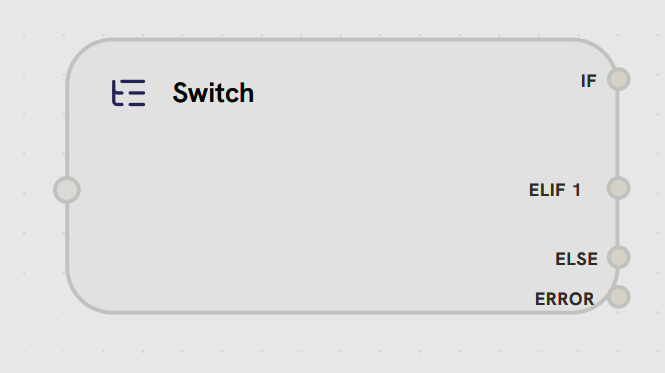
**Right Side Handles (Dynamic):**
* **IF:** First condition branch (primary path)
* Activated when IF conditions evaluate to true
* Routes to nodes for first conditional path
* **ELIF 1, ELIF 2, ...:** Additional condition branches
* Evaluated in order if previous conditions are false
* Multiple ELIF branches can be added dynamically
* Each represents an else-if conditional path
* **ELSE:** Fallback branch
* Activated when all IF/ELIF conditions are false
* Default path when no conditions match
* Always evaluated last
* **ERROR:** Error handling path
* Activated on condition evaluation errors
* Passes error details
* Allows graceful error recovery
Switch nodes support dynamic branching: you can add multiple ELIF branches for complex conditional logic. Branches are evaluated in order: IF → ELIF 1 → ELIF 2 → ... → ELSE.
**Condition Operators:**
Splox switch nodes support 14 different operators for flexible conditional logic:
Check if value contains substring (case-insensitive)
**Example:** `"Hello World" contains "world"` → `true`
Check if value does not contain substring
**Example:** `"Hello World" not_contains "xyz"` → `true`
Exact match comparison (case-insensitive)
**Example:** `"admin" equals "ADMIN"` → `true`
Not equal comparison
**Example:** `"user" not_equals "admin"` → `true`
Check if value starts with prefix
**Example:** `"Hello World" starts_with "Hello"` → `true`
Check if value ends with suffix
**Example:** `"file.pdf" ends_with ".pdf"` → `true`
Check if value exists in comma-separated list
**Example:** `"apple" in "apple,banana,orange"` → `true`
Check if value does not exist in list
**Example:** `"grape" not_in "apple,banana,orange"` → `true`
Check if value is empty, null, `[]`, or `{}`
**Example:** `"" is_empty` → `true`
Check if value has content
**Example:** `"Hello" is_not_empty` → `true`
Check if value is truthy (`true`, `1`, `yes`, `y`)
**Example:** `"true" is_true` → `true`
Check if value is falsy (`false`, `0`, `no`, `n`)
**Example:** `"false" is_false` → `true`
Greater than (numeric comparison with string fallback)
**Example:** `10 gt 5` → `true`
Less than
**Example:** `3 lt 7` → `true`
Greater than or equal
**Example:** `10 gte 10` → `true`
Less than or equal
**Example:** `5 lte 8` → `true`
**Unary operators** (`is_empty`, `is_not_empty`, `is_true`, `is_false`) don't require a right operand.
**Condition Logic:**
**All conditions must be true**
```typescript theme={null}
if (condition1 && condition2 && condition3) {
// Take this path
}
```
Use for: Strict validation, multiple requirement checks
**Any condition can be true**
```typescript theme={null}
if (condition1 || condition2 || condition3) {
// Take this path
}
```
Use for: Flexible matching, fallback scenarios
**Branching:**
Switch nodes support multiple branches evaluated in order:
```mermaid theme={null}
%%{init: {'theme':'base', 'themeVariables': {'primaryColor':'#f5f5f5','primaryTextColor':'#171717','primaryBorderColor':'#171717','lineColor':'#171717','secondaryColor':'#ffffff','tertiaryColor':'#f5f5f5','background':'#ffffff','mainBkg':'#f5f5f5','secondBkg':'#ffffff','textColor':'#171717','nodeTextColor':'#171717','nodeBorder':'#171717','edgeLabelBackground':'#ffffff'}}}%%
graph TB
Switch{Switch Node}
Switch --> |IF condition| Path1[Path 1]
Switch --> |ELIF condition| Path2[Path 2]
Switch --> |ELIF condition| Path3[Path 3]
Switch --> |ELSE| Default[Default Path]
style Switch fill:#ffffff,stroke:#171717
style Path1 fill:#ffffff,stroke:#171717
style Path2 fill:#ffffff,stroke:#171717
style Path3 fill:#ffffff,stroke:#171717
style Default fill:#ffffff,stroke:#171717
```
```mermaid theme={null}
%%{init: {'theme':'base', 'themeVariables': {'primaryColor':'#252526','primaryTextColor':'#fafafa','primaryBorderColor':'#fafafa','lineColor':'#fafafa','secondaryColor':'#1e1e1e','tertiaryColor':'#252526','background':'#1e1e1e','mainBkg':'#252526','secondBkg':'#1e1e1e','textColor':'#fafafa','nodeTextColor':'#fafafa','nodeBorder':'#fafafa','edgeLabelBackground':'#252526'}}}%%
graph TB
Switch{Switch Node}
Switch --> |IF condition| Path1[Path 1]
Switch --> |ELIF condition| Path2[Path 2]
Switch --> |ELIF condition| Path3[Path 3]
Switch --> |ELSE| Default[Default Path]
style Switch fill:#1e1e1e,stroke:#fafafa
style Path1 fill:#1e1e1e,stroke:#fafafa
style Path2 fill:#1e1e1e,stroke:#fafafa
style Path3 fill:#1e1e1e,stroke:#fafafa
style Default fill:#1e1e1e,stroke:#fafafa
```
* **IF:** First condition evaluated
* **ELIF:** Additional conditions (evaluated if previous failed)
* **ELSE:** Default path if no conditions match
**Example Use Cases:**
* Content moderation (check for inappropriate content)
* User role routing (admin vs. user paths)
* Error handling (check for error states)
* A/B testing (route based on user segment)
***