> ## Documentation Index
> Fetch the complete documentation index at: https://docs.splox.io/llms.txt
> Use this file to discover all available pages before exploring further.
# Tool Edges
> Connect Agent nodes to tools for AI-powered function calling
## Tool Edges
**Purpose:** Connect Agent nodes to Tool nodes for AI tool calling
Tool edges are special connections that make tools available to Agent nodes. When an Agent is connected to Tool nodes via tool edges, those tools become part of the Agent's available function set.
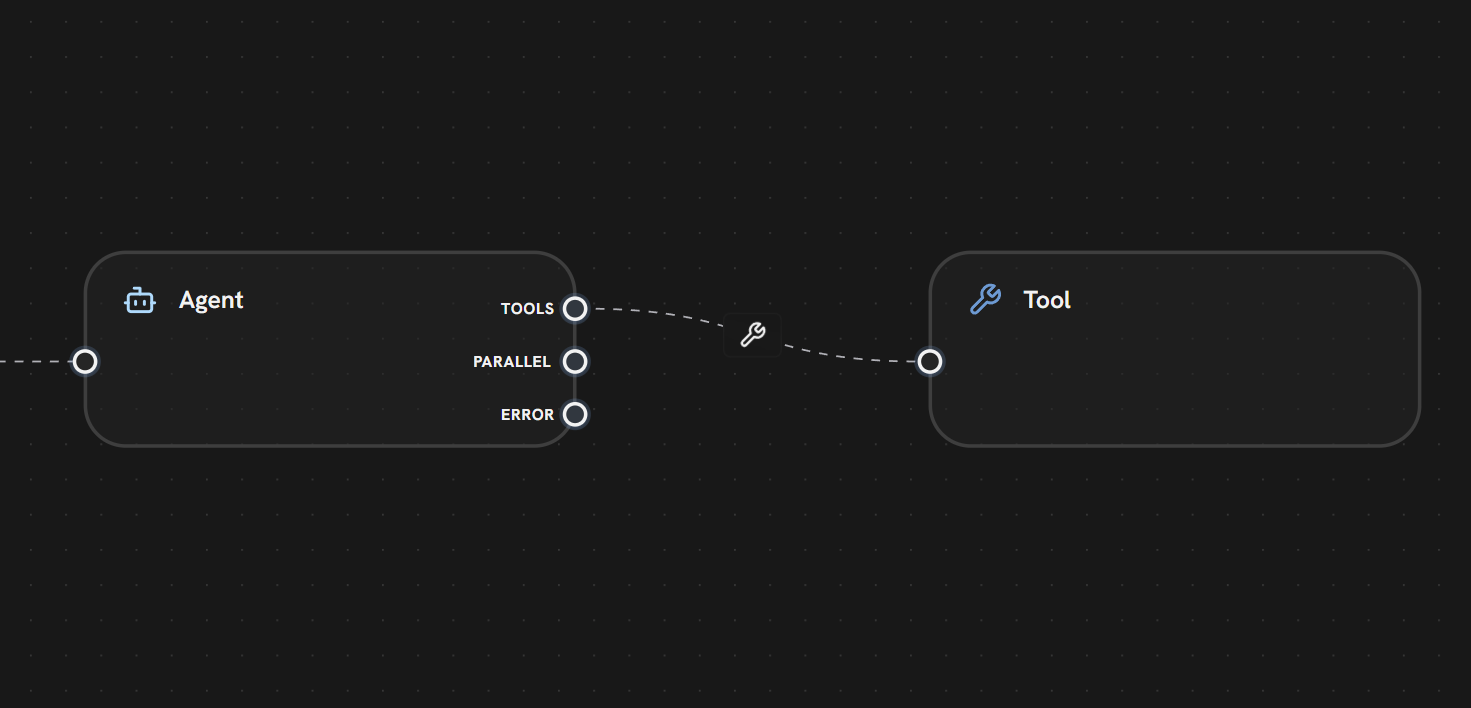 **In this example:**
* The **Agent Node** has a **TOOLS** output handle
* A **tool edge** (dashed line with 🔧 wrench icon) connects to the **Tool Node**
* The tool becomes available to the Agent for function calling
* The Agent can decide when and how to use this tool during its iteration loop
**Other handles visible:**
* **PARALLEL** — For standard execution flow (to downstream nodes)
* **ERROR** — For error handling
**How It Works:**
Connect Tool nodes to an Agent node's TOOLS handle using tool edges
The Agent automatically discovers all connected tools at the start of its loop
During execution, the LLM decides which tools to call based on the conversation
Tools execute and return results to the Agent
The Agent can call tools multiple times before producing a final response
**Visual Indicator:**
* Icon: 🔧 Wrench
* Label: Tool name or icon
* Connection: From Agent's TOOLS handle to Tool node's input
**Example Use Case:**
An AI customer support agent with three tools:
* **Search Knowledge Base** — Find help articles
* **Check Order Status** — Query order database
* **Create Ticket** — Generate support ticket
The Agent can use any combination of these tools to answer the user's question.
Tool edges are **not** execution edges — they don't trigger node execution directly. They only define which tools are available to the Agent. The Agent handles tool execution internally during its iteration loop.
***
***
## What's Next?
Learn how Agents use tools in their iteration loop
Explore available tool types and MCP servers
Standard execution flow between nodes
**In this example:**
* The **Agent Node** has a **TOOLS** output handle
* A **tool edge** (dashed line with 🔧 wrench icon) connects to the **Tool Node**
* The tool becomes available to the Agent for function calling
* The Agent can decide when and how to use this tool during its iteration loop
**Other handles visible:**
* **PARALLEL** — For standard execution flow (to downstream nodes)
* **ERROR** — For error handling
**How It Works:**
Connect Tool nodes to an Agent node's TOOLS handle using tool edges
The Agent automatically discovers all connected tools at the start of its loop
During execution, the LLM decides which tools to call based on the conversation
Tools execute and return results to the Agent
The Agent can call tools multiple times before producing a final response
**Visual Indicator:**
* Icon: 🔧 Wrench
* Label: Tool name or icon
* Connection: From Agent's TOOLS handle to Tool node's input
**Example Use Case:**
An AI customer support agent with three tools:
* **Search Knowledge Base** — Find help articles
* **Check Order Status** — Query order database
* **Create Ticket** — Generate support ticket
The Agent can use any combination of these tools to answer the user's question.
Tool edges are **not** execution edges — they don't trigger node execution directly. They only define which tools are available to the Agent. The Agent handles tool execution internally during its iteration loop.
***
***
## What's Next?
Learn how Agents use tools in their iteration loop
Explore available tool types and MCP servers
Standard execution flow between nodes