> ## Documentation Index
> Fetch the complete documentation index at: https://docs.splox.io/llms.txt
> Use this file to discover all available pages before exploring further.
# Run
> One execution of an agent: its events, messages, outputs, sub-runs and usage
A run is one execution of an agent. One turn of a chat is a run; a sub-agent
spawn is a run; a program calling an agent from its own code starts a run. They
are all the same object, with the same history behind them.
A run keeps an address rather than a copy of what it did:
```json theme={null}
{
"id": "run_01JAZ6Y5M3Q8F7N2R4T6V9W0XC",
"harness_id": "h_01KX2NXA2CFN68FC69A79RQGH4",
"harness_commit": "371758ecf28e8240192e4731080a7436fb492a09",
"conversation_id": "conv_01JAZ6Y5M3Q8F7N2R4T6V9W0XD",
"parent_chat_id": null,
"status": "succeeded",
"created_at": "2026-09-02T07:24:01Z",
"completed_at": "2026-09-02T07:24:25Z",
"failure": null,
"metadata": {}
}
```
`harness_commit` is the exact commit of the harness this run executed — the tip of
`main` when the run was created. It is the tree itself, and it is what the run is
reproducible from.
## Status
```
queued running waiting cancelling succeeded failed cancelled
```
`waiting` is the state a run sits in when it has raised a request for human input;
answering it is what lets the run go on — see [Interactions](/api/interactions).
Cancelling is idempotent, and a run already in a terminal state comes back
unchanged.
A run that reaches its agent's `max_iterations` while the model is still calling
tools ends there rather than continuing. That cap is a field on the agent; the
starter's agents set it to 1000.
## What a run leaves behind
Each message has a role and a list of content parts: `text`, `json`, or `file`
with a URL. A tool call and its result are messages too, which is why a turn can
be replayed exactly as it happened.
An output is `{ id, run_id, type, name, value, created_at }` with `type` either
`result` or `artifact`. This is where a run puts the thing it was asked for, so a
caller does not have to parse it out of prose.
Every event carries `sequence`, `type`, `created_at` and a `data` object:
```
run.created run.status_changed message.created
output.created interaction.created interaction.answered
usage.updated hook.called hook.fallback
output.rejected
```
`hook.fallback` is the one to know: it says a hook of yours did not answer, names
the point, says what the hook did instead of answering, and says how old the
replayed answer is. Read events live over SSE or as durable pages; see
[Streaming](/api/streaming).
`GET /v2/runs/{run_id}/tree` returns `{ root_run_id, runs, generated_at }`, where
each entry is a run plus its `depth` and its `child_run_ids`. A sub-agent run is a
run in a chat of its own, parented to the caller's — the tree is how you see the
whole piece of work rather than the one conversation you were watching.
`GET /v2/runs/{run_id}/usage` answers with these, and they include the run's
descendants:
Uncached prompt tokens only. An agent run reuses a large cached prefix, so this
alone understates what the run read.
input + output + cache read + cache write. The whole picture.
A non-negative decimal amount as a string, never a JSON floating-point number.
Three uppercase letters.
## A turn of a chat is a run
In the app you see the same object from the other side. Under a finished turn is
the model it ran on, when it ran, how long it took and how fast it generated:
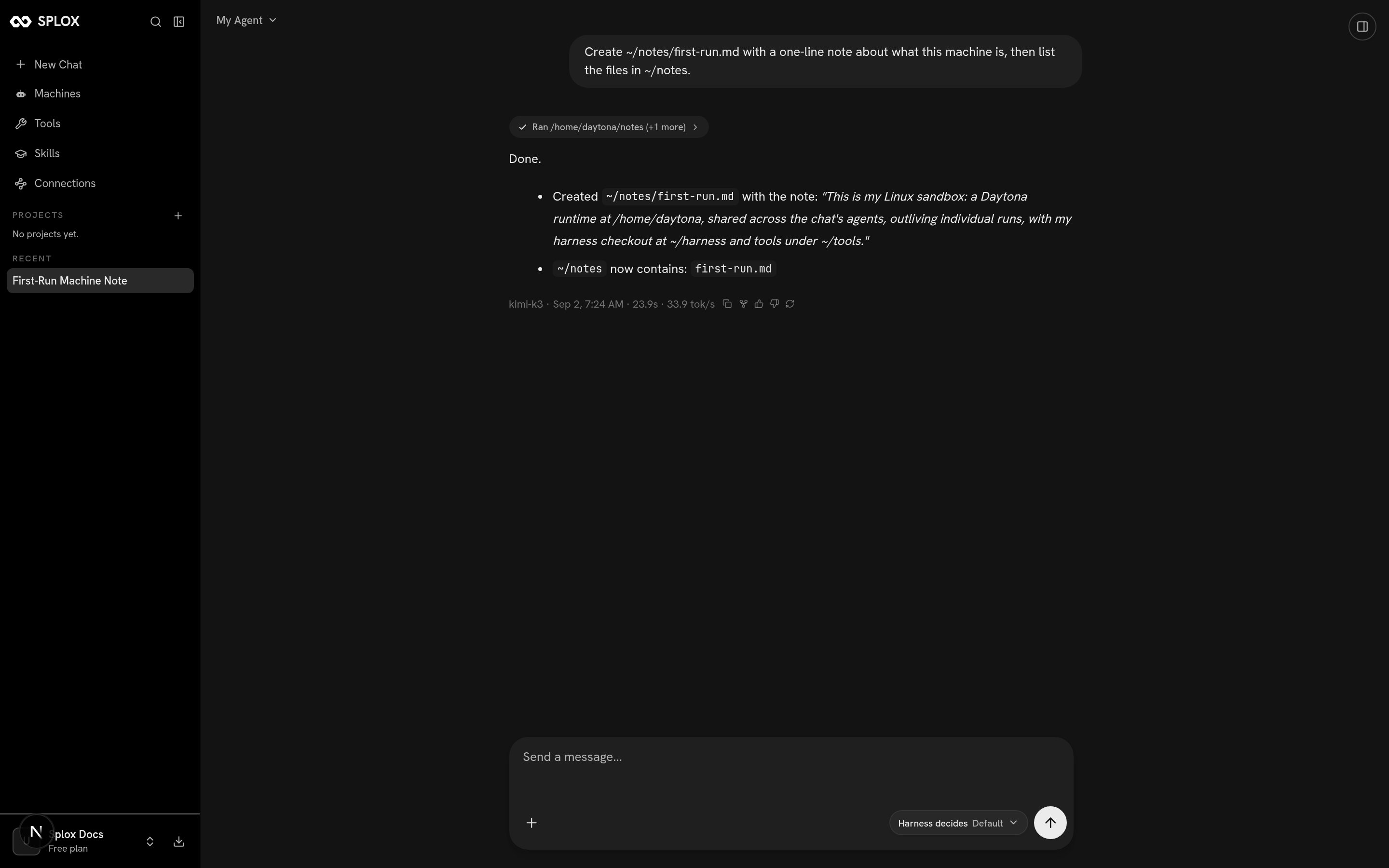 ```text theme={null}
kimi-k3 · Sep 2, 7:24 AM · 23.9s · 33.9 tok/s
```
Expanding the chip above the answer shows the run's own record: the model's
reasoning, then every tool call in order, with the arguments it passed and what
came back.
## Runs from your own code
```python theme={null}
run = client.runs.create("Summarize the latest sales report", harness_id=harness.id)
run = run.wait()
for message in run.messages().data:
print(f"[{message.role}] {message.text}")
usage = run.usage()
print(usage.input_tokens, usage.output_tokens, usage.amount, usage.currency)
```
Every `POST /v2/runs` carries an idempotency key; retrying with the same key and
body returns the same run rather than starting a second one. Pass a `chat_id` to
continue a conversation instead of starting one.
Creating, listing, cancelling, and reading every one of these surfaces.
Events over SSE, reconnection, and the terminal event.
```text theme={null}
kimi-k3 · Sep 2, 7:24 AM · 23.9s · 33.9 tok/s
```
Expanding the chip above the answer shows the run's own record: the model's
reasoning, then every tool call in order, with the arguments it passed and what
came back.
## Runs from your own code
```python theme={null}
run = client.runs.create("Summarize the latest sales report", harness_id=harness.id)
run = run.wait()
for message in run.messages().data:
print(f"[{message.role}] {message.text}")
usage = run.usage()
print(usage.input_tokens, usage.output_tokens, usage.amount, usage.currency)
```
Every `POST /v2/runs` carries an idempotency key; retrying with the same key and
body returns the same run rather than starting a second one. Pass a `chat_id` to
continue a conversation instead of starting one.
Creating, listing, cancelling, and reading every one of these surfaces.
Events over SSE, reconnection, and the terminal event.