> ## Documentation Index
> Fetch the complete documentation index at: https://docs.splox.io/llms.txt
> Use this file to discover all available pages before exploring further.
# Have it reach you
> Asking for a Telegram bot, a mailbox watcher or a notification — what the agent builds, what it needs from you, and what running forever means
A chat is something you start. Everything on this page is the other direction:
the agent starting something, because a message came in, or because a condition
you named turned true.
What the agent builds for that is a **program** — a loop that lives on your
machine, in the same repository as everything else about your agent, running as
long as the machine does. It is not a webhook you register, and there is no
integrations page to fill in.
```text theme={null}
Watch your email. When a message arrives, read it and reply to whoever sent it,
and keep a log I can read afterwards. Keep it running after this chat ends, and
tell me the address to write to.
```
## What the agent did about it
* **Found the address.** Your agent has an email address of its own, from the
platform's email package — it did not need one from me. It printed it:
`a-a5dabeb583ad40df02066fbf7beb39cb@splox.io`.
* **Read its own repository first** — `PROGRAMS.md`, `AGENTS.md`, and the two
programs already there — before writing anything.
* **Wrote a program**: a poll loop, a `Butler` agent for composing the reply, a
prompt file, a state file and a README.
* **Started it** with the ordinary command anybody would use for a background
script, so it outlives the turn:
```bash theme={null}
setsid nohup python3 ~/harness/programs/mailbutler/main.py \
> /tmp/mailbutler.log 2>&1 &
```
* **Changed its own design mid-run.** Its first version had the agent send the
mail itself; it decided the loop should send it instead, in its own words, "that
way the 'reply only to the sender' rule is enforced in code, not by prompt
obedience," and restructured.
```python theme={null}
"""Watch the harness's own mailbox and answer whoever writes to it.
Polls the agent address with tools.email, hands every new message to the
Butler agent — which replies from the same address — and appends both the
message and the answer to /home/daytona/mailbutler.log. State survives a
restart in /home/daytona/.mailbutler.json; a lockfile makes starting it
twice harmless.
Start it the ordinary way:
setsid nohup python3 ~/harness/programs/mailbutler/main.py \
> /tmp/mailbutler.log 2>&1 &
"""
from __future__ import annotations
import datetime as dt
import fcntl
import hashlib
import json
import sys
import time
import traceback
from pathlib import Path
sys.path.insert(0, "/home/daytona") # tools.email lives there
from splox import agent
from tools.agents import schema
from tools.email import email_address, email_inbox, email_send
HERE = Path(__file__).parent
STATE = Path("/home/daytona/.mailbutler.json")
LOG = Path("/home/daytona/mailbutler.log")
LOCK = Path("/tmp/mailbutler.lock")
POLL_SECONDS = 20
Reply = schema(reply=str, summary=str)
def prompt():
"""The prompt as it is now — an edit lands on the next message."""
return (HERE / "prompts" / "butler.md").read_text(encoding="utf-8")
butler = agent(
"Butler",
system_prompt=prompt,
model="kimi-k3",
provider="splox",
tools=["system:compute"],
max_iterations=25,
)
# Senders a reply can only bounce off of.
SKIP_LOCALPARTS = {"mailer-daemon", "postmaster", "no-reply", "noreply", "bounce"}
def skip_reason(sender: str, me: str) -> str | None:
sender = (sender or "").strip().lower()
if not sender:
return "no sender"
if sender == me.lower():
return "own outgoing mail"
if sender.split("@", 1)[0] in SKIP_LOCALPARTS:
return "bounce/no-reply address"
return None
def handle(msg, me: str) -> None:
"""Reply to one message and write the exchange to the log."""
sender = (msg.get("sender") or "").strip()
subject = (msg.get("subject") or "").strip() or "(no subject)"
body = str(msg.get("body", ""))
ask = (
f"A new email has arrived at {me}.\n\n"
f"Sender: {sender}\nSubject: {subject}\n\n"
f"Message:\n{body[:8000]}\n\n"
"Reply to it now, following your instructions."
)
try:
out = butler(ask, schema=Reply, wait=True).output()
reply_text, summary = out["reply"], out["summary"]
except Exception as failure: # the correspondent must never be left hanging
traceback.print_exc()
reply_text = (
"Thank you for your email — it reached me, but I could not compose "
"a proper reply just now. I'll come back to you."
)
summary = f"butler run failed ({failure}); sent holding reply instead"
email_send(to=[sender], subject=reply_subject(subject), text=reply_text)
log(f"--- reply sent to {sender} " + "-" * 40)
log(reply_text)
log(summary)
def poll(me: str, state: dict) -> None:
inbox = email_inbox(limit=100, since=state.get("since"))
fresh = [m for m in inbox.get("messages", []) if key_of(m) not in set(state["seen"])]
fresh.sort(key=lambda m: str(m.get("timestamp") or "")) # oldest first
for msg in fresh:
state["seen"].append(key_of(msg))
state["since"] = str(msg.get("timestamp") or state.get("since") or "")
why = skip_reason(msg.get("sender"), me)
if why:
log(f"{utcnow()} UTC skipped {msg.get('sender')!r}: {why}")
continue
handle(msg, me)
save_state(state)
def main() -> None:
holder = LOCK.open("w")
try:
fcntl.flock(holder, fcntl.LOCK_EX | fcntl.LOCK_NB)
except BlockingIOError:
print("another mail butler already holds the lock; exiting", flush=True)
return
me = email_address()["address"]
state = load_state()
log(f"{utcnow()} UTC mail butler watching {me} (since {state.get('since')})")
while True:
try:
poll(me, state)
except Exception:
traceback.print_exc()
log(f"{utcnow()} UTC poll failed; sleeping and retrying")
time.sleep(POLL_SECONDS)
if __name__ == "__main__":
main()
```
Trimmed: the logging helpers, the state file reader and writer, and the message
hashing are cut for length. The whole file is on the machine at
`~/harness/programs/mailbutler/main.py`.
## What it needs from you
Exactly one thing, and which one depends on how the outside world reaches in.
| You ask for | What it needs | Where that goes |
| --------------------------------------- | ---------------------------------------------------------------------------------------------------- | ------------------------------------------------------------------------------- |
| Email — watch a mailbox, mail me when X | **Nothing.** Your agent has an address already, and it will tell you what it is. | — |
| Telegram | **A bot token.** You make the bot with [@BotFather](https://t.me/botfather) and hand over the token. | Connections → Secrets, as `TELEGRAM_BOT_TOKEN` |
| Slack, Discord, WhatsApp | **A bot token**, same shape. | Connections → Secrets, or the matching entry on [Tools](/ask/connect-a-service) |
| A webhook somebody else calls | **A URL they can reach.** This is the one the platform does not give you. | — |
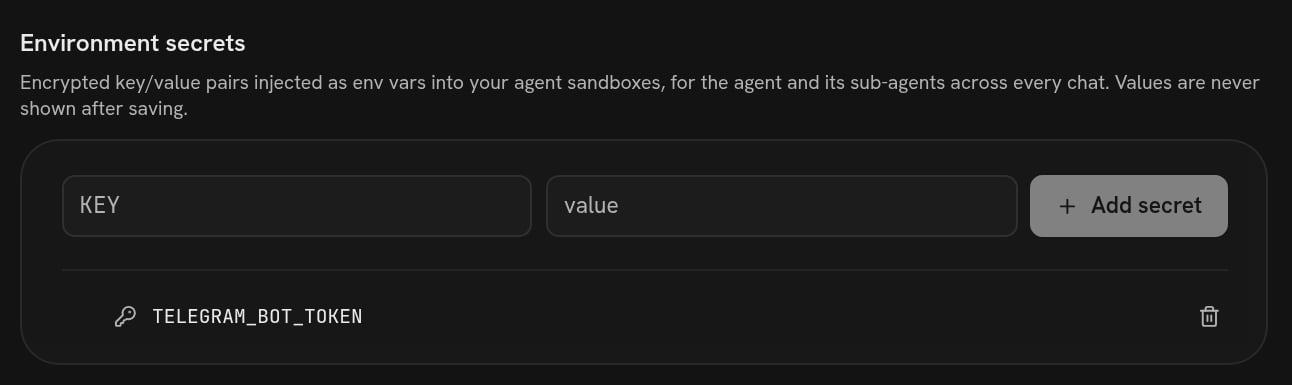 Put the token there rather than in the chat. Secrets are injected as environment
variables into every run on the machine, so the program reads
`os.environ["TELEGRAM_BOT_TOKEN"]` and nothing writes a token into a file in git.
There is one trap here, and it is the account's own history: version 4 of this
harness was `Add telegram bot program`, and version 5 was `telegram: read bot
token inside call(), not at import time`.
The bot read `os.environ["TELEGRAM_BOT_TOKEN"]` at the top of the file. The
platform imports that file every time it needs to know who an agent is — from
processes that do not carry your secrets — so every such question died with
`KeyError: 'TELEGRAM_BOT_TOKEN'` before the agent was ever named. Reading the
token inside the function that uses it fixes it. If a bot you asked for works
when you test it and then fails oddly, this is the first thing to ask about.
The webhook case is worth being blunt about: your machine is not addressable from
the internet, so "let Stripe call you" is not something the agent can arrange on
its own. What it can do is poll — an API, a mailbox, a repository — on a timer,
which is [On a schedule](/ask/on-a-schedule).
## What running forever means
A program started in a chat belongs to the **machine**, not to the run and not to
the conversation. It keeps going after the turn ends, after the chat ends, and
into tomorrow.
It stops in exactly two ways from outside: somebody presses **Stop** on the
machine, or the plan behind the account stops keeping machines running. Nothing
reaps it on a schedule, and no conversation ending takes it down. On a paid plan
the machine's live state carries no idle timeout at all; on a free plan it stops
itself after 30 minutes with nothing touching it, and the program stops with it.
See [Machine](/concepts/machine).
It can also stop on its own, by crashing. That is what the loop above is
defending against with its `try` around the poll — an exception writes a line to
the log and the loop sleeps and tries again, instead of the watcher quietly
disappearing.
So the sentence worth adding to the ask is: **"make restarting it harmless."**
The agent that wrote the mail butler did it unasked — a state file with a
watermark and the keys of everything already answered, so a restart answers
nothing twice, and a lockfile so starting it a second time exits instead of
double-replying. Starting it again while it was already up printed exactly that
and stopped:
```text theme={null}
another mail butler already holds the lock; exiting
```
Ask for it if the agent does not offer it, because the alternative is that a
machine restart mails your correspondents twice.
Starting a program is not publishing it. The code goes into the harness and
becomes a version; the *running process* is on this machine only. If you move to
another machine, or restart this one, somebody has to start it again — which is
one sentence in a chat, and a reasonable thing to ask the agent to check for at
the top of a conversation.
## Checking it
Three checks, cheapest first.
**Ask.** "Is the mail watcher running?" The agent looks and tells you. It is one
`ps` on its own machine.
**Read the log.** The program the agent wrote logs both sides of every exchange
to `/home/daytona/mailbutler.log`, and it says so in its own README:
```text theme={null}
2026-09-02 13:45:15 UTC mail butler watching a-a5dabeb…@splox.io (since 2026-09-02T13:45:15Z)
2026-09-02 13:50:01 UTC poll failed; sleeping and retrying
```
That second line is the log doing its job. The poll had failed with a `524` from
the platform's own tool endpoint; the loop caught it, wrote the line, and slept
instead of dying. A watcher without a log is a watcher you cannot answer any
question about, so "keep a log I can read" is worth putting in the original ask.
**Use it from outside.** Mail the address; message the bot. This is the only check
that tests the whole path, and it is the one to do before you rely on it.
The agent's runs are visible too. Every time the loop hands a message to its
agent, that is a real run: it shows up in your chat list with its whole
conversation, and it is billed like any other. The program's log says what came
in; the run says what the agent thought about it.
## Stopping it, and undoing it
Two separate things.
| What you want | What to say |
| ----------------------- | ------------------------------------------------------------------------------------------------ |
| Stop it now | "Stop the mail watcher." The agent kills the process. The code stays. |
| Stop it and forget it | "Stop the mail watcher and take the program out." The process dies and the removal is a version. |
| Stop everything at once | Stop the machine, from the Machines screen. Every program on it stops. Files survive. |
Going back to before the change is the same as any other rollback — a version
carries the program, so undoing the version undoes the program.
[Versions](/inside/versions) is that page.
The same shape, triggered by the calendar instead of by a message.
The whole conversation, including the token trap as it actually happened.
Put the token there rather than in the chat. Secrets are injected as environment
variables into every run on the machine, so the program reads
`os.environ["TELEGRAM_BOT_TOKEN"]` and nothing writes a token into a file in git.
There is one trap here, and it is the account's own history: version 4 of this
harness was `Add telegram bot program`, and version 5 was `telegram: read bot
token inside call(), not at import time`.
The bot read `os.environ["TELEGRAM_BOT_TOKEN"]` at the top of the file. The
platform imports that file every time it needs to know who an agent is — from
processes that do not carry your secrets — so every such question died with
`KeyError: 'TELEGRAM_BOT_TOKEN'` before the agent was ever named. Reading the
token inside the function that uses it fixes it. If a bot you asked for works
when you test it and then fails oddly, this is the first thing to ask about.
The webhook case is worth being blunt about: your machine is not addressable from
the internet, so "let Stripe call you" is not something the agent can arrange on
its own. What it can do is poll — an API, a mailbox, a repository — on a timer,
which is [On a schedule](/ask/on-a-schedule).
## What running forever means
A program started in a chat belongs to the **machine**, not to the run and not to
the conversation. It keeps going after the turn ends, after the chat ends, and
into tomorrow.
It stops in exactly two ways from outside: somebody presses **Stop** on the
machine, or the plan behind the account stops keeping machines running. Nothing
reaps it on a schedule, and no conversation ending takes it down. On a paid plan
the machine's live state carries no idle timeout at all; on a free plan it stops
itself after 30 minutes with nothing touching it, and the program stops with it.
See [Machine](/concepts/machine).
It can also stop on its own, by crashing. That is what the loop above is
defending against with its `try` around the poll — an exception writes a line to
the log and the loop sleeps and tries again, instead of the watcher quietly
disappearing.
So the sentence worth adding to the ask is: **"make restarting it harmless."**
The agent that wrote the mail butler did it unasked — a state file with a
watermark and the keys of everything already answered, so a restart answers
nothing twice, and a lockfile so starting it a second time exits instead of
double-replying. Starting it again while it was already up printed exactly that
and stopped:
```text theme={null}
another mail butler already holds the lock; exiting
```
Ask for it if the agent does not offer it, because the alternative is that a
machine restart mails your correspondents twice.
Starting a program is not publishing it. The code goes into the harness and
becomes a version; the *running process* is on this machine only. If you move to
another machine, or restart this one, somebody has to start it again — which is
one sentence in a chat, and a reasonable thing to ask the agent to check for at
the top of a conversation.
## Checking it
Three checks, cheapest first.
**Ask.** "Is the mail watcher running?" The agent looks and tells you. It is one
`ps` on its own machine.
**Read the log.** The program the agent wrote logs both sides of every exchange
to `/home/daytona/mailbutler.log`, and it says so in its own README:
```text theme={null}
2026-09-02 13:45:15 UTC mail butler watching a-a5dabeb…@splox.io (since 2026-09-02T13:45:15Z)
2026-09-02 13:50:01 UTC poll failed; sleeping and retrying
```
That second line is the log doing its job. The poll had failed with a `524` from
the platform's own tool endpoint; the loop caught it, wrote the line, and slept
instead of dying. A watcher without a log is a watcher you cannot answer any
question about, so "keep a log I can read" is worth putting in the original ask.
**Use it from outside.** Mail the address; message the bot. This is the only check
that tests the whole path, and it is the one to do before you rely on it.
The agent's runs are visible too. Every time the loop hands a message to its
agent, that is a real run: it shows up in your chat list with its whole
conversation, and it is billed like any other. The program's log says what came
in; the run says what the agent thought about it.
## Stopping it, and undoing it
Two separate things.
| What you want | What to say |
| ----------------------- | ------------------------------------------------------------------------------------------------ |
| Stop it now | "Stop the mail watcher." The agent kills the process. The code stays. |
| Stop it and forget it | "Stop the mail watcher and take the program out." The process dies and the removal is a version. |
| Stop everything at once | Stop the machine, from the Machines screen. Every program on it stops. Files survive. |
Going back to before the change is the same as any other rollback — a version
carries the program, so undoing the version undoes the program.
[Versions](/inside/versions) is that page.
The same shape, triggered by the calendar instead of by a message.
The whole conversation, including the token trap as it actually happened.