> ## Documentation Index
> Fetch the complete documentation index at: https://docs.splox.io/llms.txt
> Use this file to discover all available pages before exploring further.
# Asking for a change
> You ask, the agent edits its own harness, publishes a version, and the next turn is different
Who your agent is — what it is told, which model it runs on, what tools it has,
what reaches you when you are not in the chat — is code, in a git repository
called a **harness**. You do not write that code. The agent does, when you ask it
to, in the same conversation you use for everything else.
So a change to your agent is a sentence.
```text theme={null}
Give yourself a tool for keeping notes: one call that writes a note under a
subject, one that reads it back, one that lists what I've got. Publish it when
it works.
```
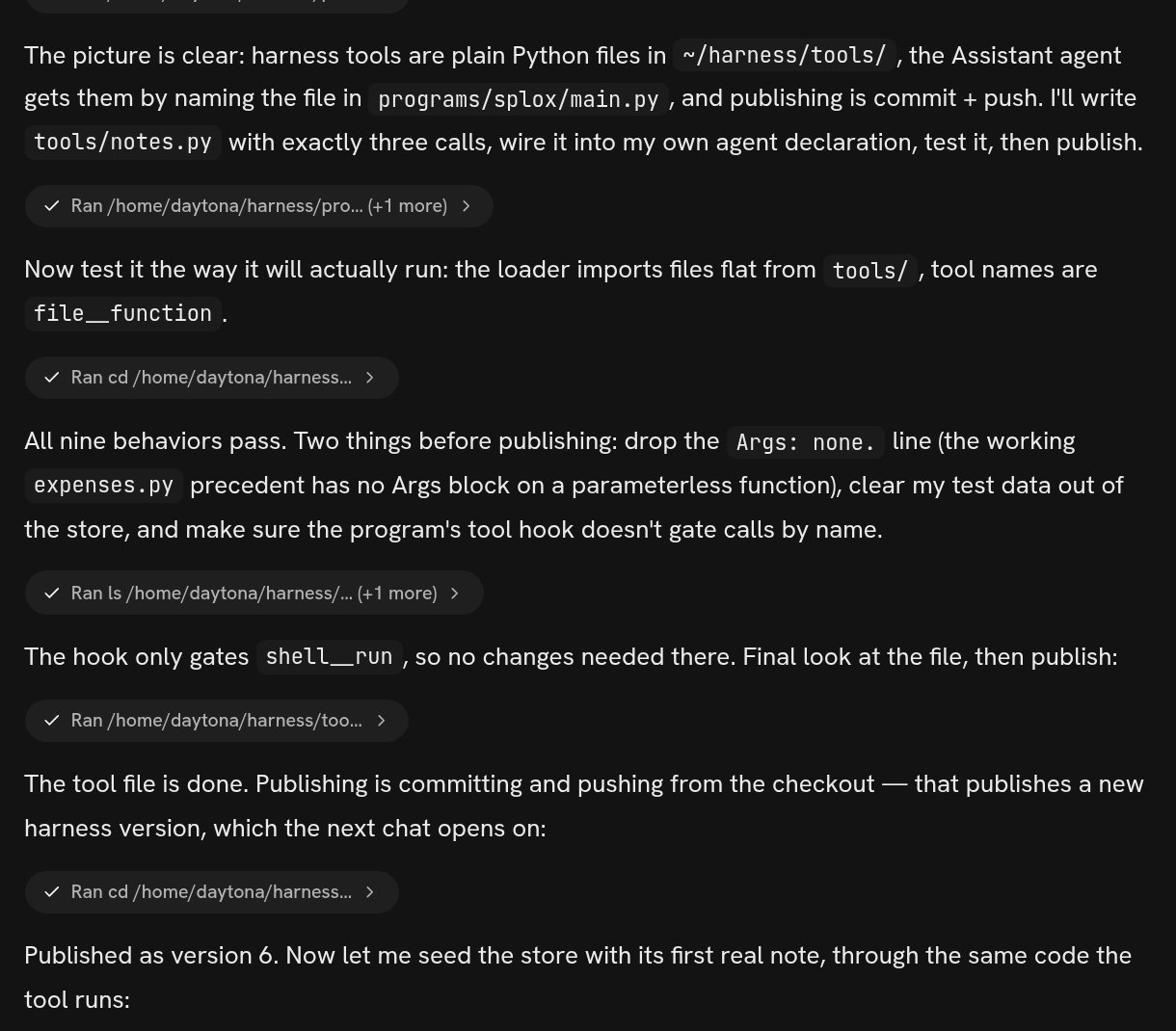
Nine minutes later that chat came back with:
```text theme={null}
Done, and published as version 6 (326d287..2677a1a).
What you've got — notes__write, notes__read, notes__list:
...
Tested before publishing: write/overwrite/append, messy-subject folding,
read-back, listing, missing-subject error text, empty-subject rejection, and a
traversal attempt (../../etc/passwd → safely folded to etc-passwd.md). All
passed.
```
The next message in that chat could call `notes__write`, and every chat opened
after it can too. Nothing was installed, restarted or deployed, and nobody opened
an editor.
 ## The loop
Say what you want the agent to be able to do, or how you want it to behave.
Ask for the outcome — "keep notes for me" — rather than for a file with
particular contents. The agent reads its own repository before it changes
anything, so it already knows the shape its code has to have.
Your machine carries the harness at `~/harness`. The agent edits that
directory: a new file under `tools/`, a line in `programs/splox/main.py`, a
paragraph in a prompt. This is the part you can watch happen — every edit is
a tool call in the transcript.
A good change ends with the agent having run the thing. In the transcript
above it loaded the tool the same way the platform's own loader does and
exercised nine cases against it, including a path-traversal attempt, before
it published anything.
`git commit` and `git push` from the checkout. That is what a version is —
there is no separate deploy. The push either produces the next numbered
version or is refused with what is wrong with the tree, and until it succeeds
nothing anybody else runs has changed.
The platform asks the harness who your agent is at the moment it needs to
know — at the start of every run. There is nothing to reload.
## Two speeds, and the one that surprises people
A change lands in **this** conversation as soon as the file is saved, because
this machine is reading the checkout the agent just edited. The next message you
send picks it up.
A change reaches **a new chat, or a second machine** only after the publish. If
you ask for something, see it work, then open a fresh chat and find the old
behavior, the answer is almost always that the agent edited but did not push.
```text theme={null}
You: did you publish that?
```
is a reasonable follow-up, and the agent can do it in one turn.
Say "publish it when it works" in the original ask and you skip the round trip.
The agent that wrote the notes tool tested it first and pushed once, which is
also the order you want: a published version that was never run is a version you
will have to go back past.
## What you can ask for
"Give yourself a tool that does X." A named call it can reach for, described
in its own words, on every run from then on.
"Answer me in Telegram." "Watch this mailbox." A program that keeps running
on the machine after the conversation ends.
"Do this every morning." The same shape, triggered by the calendar instead of
by a message.
"Be shorter." "Stop asking me before you run things." "Use a cheaper model
when we are only talking."
"Get into my Linear." Part of this one is yours: somebody has to click
Authorize.
"Put back how you answered before version 7." Every version is kept, and
going back is another ask.
## What a version is
A numbered snapshot of the whole harness, with the sentence that says why it was
made. Here is a real history, read off the account this documentation was written
from:
```text theme={null}
1 371758ec created from starters/assistant at c151b87e
2 88d560d2 Add expenses tool (ledger add/report) to Assistant
3 e3f6d06e Add nightly briefing program
4 ca4a049d Add telegram bot program
5 326d287e telegram: read bot token inside call(), not at import time
6 2677a1ab Add notes tool: write/read/list notes by subject in ~/.notes
7 a29e4d46 Revert "Add expenses tool (ledger add/report) to Assistant"
```
Version 1 is what you got when you signed up. Every line after it is somebody
asking for something. Two of them are worth reading twice: version 5, where
version 4's bot was broken, the person said so, and the fix is its own version
with its own sentence explaining what was wrong — and version 7, which is what
undoing looks like. Going back does not delete version 2; it adds a version that
carries the older tree, and the history says which change was undone.
Versions are immutable and nothing deletes one. A new chat opens on the newest;
a machine can be held on an older one.
## The two questions after every change
**Did it work?** The transcript is the first answer — the agent's edits and its
test runs are tool calls you can open. The second answer is the version list: if
the change is not in it, it was not published. Both are on
[Versions](/inside/versions).
**How do I go back?** Ask. "Undo the last change" and "go back to how you
answered before version 5" are both things the agent does with git in one turn,
and both end in a new version whose message says what was undone. If the agent
itself is the thing that got worse — it will not stop apologising, or it now
refuses ordinary work — [When it goes wrong](/inside/when-it-goes-wrong) is the
page for that, because the fix there is to pin the machine to an older version
rather than to ask the broken agent for help.
## What it costs to be wrong
A change that misses costs one run. The notes tool above was 9 minutes and \$0.37
of the account's usage, and that is the whole exposure: the previous version is
still in the list, no other machine picked the new one up until the push, and any
run already going kept the version it started on.
The thing that does not undo itself is what the agent wrote to disk. Code goes in
the harness and is versioned; files go in the machine's home directory and are
not. If an ask involves deleting or rewriting your data, that part is worth
saying out loud in the ask — "don't touch what's already in there" — because git
will not give it back.
## You can look, without writing anything
The machine opens in VS Code and over SSH from the chat's side panel. That is for
reading what the agent wrote, checking which version is running, and watching a
program's log — not for authoring. See
[VS Code and SSH](/inside/vscode-and-ssh).
The checkout at `~/harness`, what lives in it, and why the platform reads that
file at the moment it needs to know.
## The loop
Say what you want the agent to be able to do, or how you want it to behave.
Ask for the outcome — "keep notes for me" — rather than for a file with
particular contents. The agent reads its own repository before it changes
anything, so it already knows the shape its code has to have.
Your machine carries the harness at `~/harness`. The agent edits that
directory: a new file under `tools/`, a line in `programs/splox/main.py`, a
paragraph in a prompt. This is the part you can watch happen — every edit is
a tool call in the transcript.
A good change ends with the agent having run the thing. In the transcript
above it loaded the tool the same way the platform's own loader does and
exercised nine cases against it, including a path-traversal attempt, before
it published anything.
`git commit` and `git push` from the checkout. That is what a version is —
there is no separate deploy. The push either produces the next numbered
version or is refused with what is wrong with the tree, and until it succeeds
nothing anybody else runs has changed.
The platform asks the harness who your agent is at the moment it needs to
know — at the start of every run. There is nothing to reload.
## Two speeds, and the one that surprises people
A change lands in **this** conversation as soon as the file is saved, because
this machine is reading the checkout the agent just edited. The next message you
send picks it up.
A change reaches **a new chat, or a second machine** only after the publish. If
you ask for something, see it work, then open a fresh chat and find the old
behavior, the answer is almost always that the agent edited but did not push.
```text theme={null}
You: did you publish that?
```
is a reasonable follow-up, and the agent can do it in one turn.
Say "publish it when it works" in the original ask and you skip the round trip.
The agent that wrote the notes tool tested it first and pushed once, which is
also the order you want: a published version that was never run is a version you
will have to go back past.
## What you can ask for
"Give yourself a tool that does X." A named call it can reach for, described
in its own words, on every run from then on.
"Answer me in Telegram." "Watch this mailbox." A program that keeps running
on the machine after the conversation ends.
"Do this every morning." The same shape, triggered by the calendar instead of
by a message.
"Be shorter." "Stop asking me before you run things." "Use a cheaper model
when we are only talking."
"Get into my Linear." Part of this one is yours: somebody has to click
Authorize.
"Put back how you answered before version 7." Every version is kept, and
going back is another ask.
## What a version is
A numbered snapshot of the whole harness, with the sentence that says why it was
made. Here is a real history, read off the account this documentation was written
from:
```text theme={null}
1 371758ec created from starters/assistant at c151b87e
2 88d560d2 Add expenses tool (ledger add/report) to Assistant
3 e3f6d06e Add nightly briefing program
4 ca4a049d Add telegram bot program
5 326d287e telegram: read bot token inside call(), not at import time
6 2677a1ab Add notes tool: write/read/list notes by subject in ~/.notes
7 a29e4d46 Revert "Add expenses tool (ledger add/report) to Assistant"
```
Version 1 is what you got when you signed up. Every line after it is somebody
asking for something. Two of them are worth reading twice: version 5, where
version 4's bot was broken, the person said so, and the fix is its own version
with its own sentence explaining what was wrong — and version 7, which is what
undoing looks like. Going back does not delete version 2; it adds a version that
carries the older tree, and the history says which change was undone.
Versions are immutable and nothing deletes one. A new chat opens on the newest;
a machine can be held on an older one.
## The two questions after every change
**Did it work?** The transcript is the first answer — the agent's edits and its
test runs are tool calls you can open. The second answer is the version list: if
the change is not in it, it was not published. Both are on
[Versions](/inside/versions).
**How do I go back?** Ask. "Undo the last change" and "go back to how you
answered before version 5" are both things the agent does with git in one turn,
and both end in a new version whose message says what was undone. If the agent
itself is the thing that got worse — it will not stop apologising, or it now
refuses ordinary work — [When it goes wrong](/inside/when-it-goes-wrong) is the
page for that, because the fix there is to pin the machine to an older version
rather than to ask the broken agent for help.
## What it costs to be wrong
A change that misses costs one run. The notes tool above was 9 minutes and \$0.37
of the account's usage, and that is the whole exposure: the previous version is
still in the list, no other machine picked the new one up until the push, and any
run already going kept the version it started on.
The thing that does not undo itself is what the agent wrote to disk. Code goes in
the harness and is versioned; files go in the machine's home directory and are
not. If an ask involves deleting or rewriting your data, that part is worth
saying out loud in the ask — "don't touch what's already in there" — because git
will not give it back.
## You can look, without writing anything
The machine opens in VS Code and over SSH from the chat's side panel. That is for
reading what the agent wrote, checking which version is running, and watching a
program's log — not for authoring. See
[VS Code and SSH](/inside/vscode-and-ssh).
The checkout at `~/harness`, what lives in it, and why the platform reads that
file at the moment it needs to know.