> ## Documentation Index
> Fetch the complete documentation index at: https://docs.splox.io/llms.txt
> Use this file to discover all available pages before exploring further.
# Give it a tool
> Asking for a named call the agent can reach for, what it does about it, and what you see afterwards
Your agent already has a shell, so it can do almost anything once. A **tool** is
for the thing you want done the same way every time: a named call, with a
description in the agent's own words and arguments it fills in, offered to it on
every run from then on — so you stop re-explaining it, and so it stops improvising
a slightly different script each time.
Asking for one is a sentence.
```text theme={null}
Give yourself a tool for keeping notes: one call that writes a note under a
subject, one that reads it back, one that lists what I've got. Publish it when
it works.
```
## What the agent did about it
That run took 9 minutes and 15 tool calls. In order:
1. **Read its own repository.** It opened `TOOLS.md` in the checkout, listed
`tools/`, and read both files already there — `expenses.py` and `files.py` —
to see the shape a tool of this harness has.
2. **Looked at where the data would go.** It found `~/notes` already in use by
ad-hoc work in the sandbox and deliberately did not reuse it, putting the
store in `~/.notes` instead so nothing but the tool writes there.
3. **Wrote `tools/notes.py`** — three functions, with the docstrings that become
what the model is told about them.
4. **Added the file to its own declaration.** One line in
`programs/splox/main.py` changed from
`tools=["system:compute", "tools/files.py", "tools/expenses.py"]` to the same
list with `"tools/notes.py"` on the end. A tool that exists in the tree but is
not named by an agent reaches nobody.
5. **Ran it before telling me.** It loaded the file the way the platform's own
loader does and exercised nine cases: write, overwrite, append, a messy
subject, read-back, listing, the missing-subject error text, an empty subject,
and `../../etc/passwd` as a subject.
6. **Committed and pushed**, which is what publishing is.
Then it answered:
```text theme={null}
Done, and published as version 6 (326d287..2677a1a).
What you've got — notes__write, notes__read, notes__list:
- notes__write(subject, body, append=false) — writes the body under a free-text
subject. Writing the same subject again replaces it; append=true adds to the
end after a --- separator.
- notes__read(subject) — reads the note back whole. A missing subject raises an
error that names the subjects that do exist, so a near-miss gets
self-corrected instead of dead-ending.
- notes__list() — every note, one line each: subject, size, last-updated.
Design decisions worth knowing:
- Notes live in ~/.notes/ as one markdown file per subject. I deliberately
didn't reuse ~/notes, which ad-hoc work in this sandbox already uses.
- Subjects are free text; "Maria's piano school?" and "Maria's piano/school"
land on the same note. /, .., and friends are stripped, so a subject can't
climb out of the store.
- The Agent declaration in programs/splox/main.py now lists tools/notes.py, so
the next run of this chat is offered the three calls.
Tested before publishing: write/overwrite/append, messy-subject folding,
read-back, listing, missing-subject error text, empty-subject rejection, and a
traversal attempt (../../etc/passwd → safely folded to etc-passwd.md). All
passed.
```
```python theme={null}
"""Notes kept under a subject: one file each, in ~/.notes of this sandbox."""
import re
from datetime import datetime
from pathlib import Path
# The store is a directory of its own rather than ~/notes, which ad-hoc work
# in the sandbox already uses: everything this tool writes lives under here
# and nothing else does. The sandbox outlives the runs, so the notes do too.
STORE = Path.home() / ".notes"
# A subject is free text but becomes a filename: letters, digits, spaces,
# dots, dashes and underscores stay, any run of anything else folds to one
# dash. The same rule runs on read and list, so whatever a note was written
# under, it comes back under the same name — and a subject can never climb
# out of the store, because "/" and ".." do not survive it.
_UNSAFE = re.compile(r"[^A-Za-z0-9._ -]+")
def _path(subject: str) -> Path:
name = _UNSAFE.sub("-", subject).strip().strip(".-")
name = name[:80].rstrip(" .-")
if not name:
raise ValueError(
"subject cannot be empty: name the note what it is about, e.g. 'terraform state'"
)
return STORE / (name + ".md")
def _subjects() -> str:
if not STORE.exists():
return ""
return ", ".join(sorted(path.stem for path in STORE.glob("*.md")))
def write(subject: str, body: str, append: bool = False) -> str:
"""Write a note under a subject — replacing what that subject held, or adding to the end of it with append=true.
Subjects are free text ("terraform state", "Maria's piano school") and are
the name the note is read back and listed under, so writing the same
subject again is an update, not a second note. The body is stored exactly
as given; markdown is fine.
Args:
subject: What the note is about; this is its name everywhere else.
body: The note itself.
append: True adds the body to the end of the existing note, after a
separator, instead of replacing it.
"""
path = _path(subject)
path.parent.mkdir(parents=True, exist_ok=True)
existed = path.exists()
appending = append and existed
if appending:
with path.open("a", encoding="utf-8") as note:
note.write("\n\n---\n\n" + body)
else:
path.write_text(body, encoding="utf-8")
verb = "appended to" if appending else "replaced" if existed else "wrote"
return "%s: %s, %d bytes" % (path, verb, path.stat().st_size)
def read(subject: str) -> str:
"""Read a note back whole by its subject — the body exactly as written, or an error naming the subjects that do exist.
Args:
subject: The subject the note was written under.
"""
path = _path(subject)
if not path.exists():
have = _subjects()
raise FileNotFoundError(
"no note under %r — subjects I have: %s" % (subject, have or "none yet")
)
return path.read_text(encoding="utf-8")
# This function shadows the built-in `list` for the rest of the module, which
# is why no other function here annotates or names the type: keep it that way.
def list() -> str:
"""List every note kept on this machine — one line per subject with its size and when it was last written."""
if not STORE.exists():
return "no notes yet in %s — write the first with notes__write(subject=..., body=...)" % STORE
rows = []
for path in sorted(STORE.glob("*.md"), key=lambda p: p.stat().st_mtime):
stat = path.stat()
rows.append(
"- %s (%d bytes, updated %s)"
% (path.stem, stat.st_size, datetime.fromtimestamp(stat.st_mtime).strftime("%Y-%m-%d %H:%M"))
)
return "%d note%s in %s:\n%s" % (len(rows), "" if len(rows) == 1 else "s", STORE, "\n".join(rows))
```
## How you see it afterwards
**In the next message.** The tool is offered by name, and the transcript shows it
being called instead of a shell command:
```text theme={null}
You: Save a note called standup: blocked on the invoice import, waiting on Marta.
```
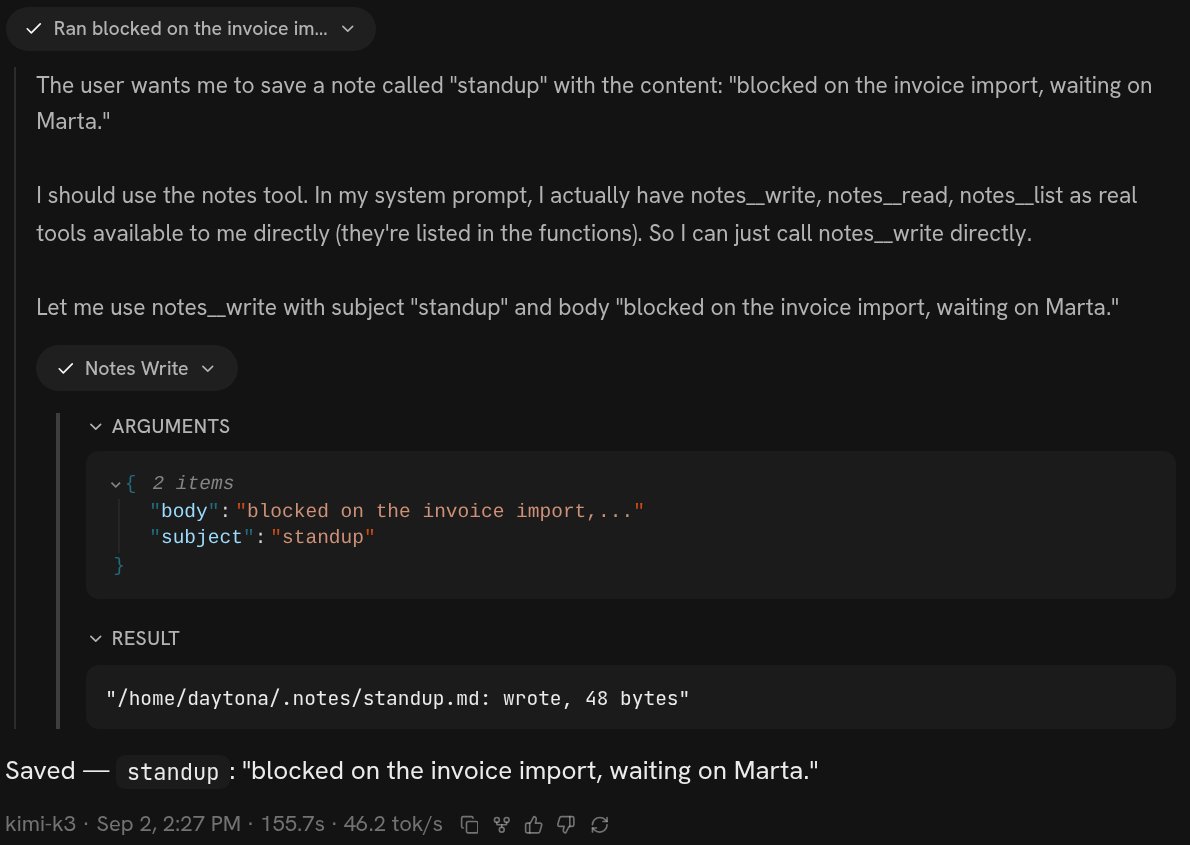 The chip reads **Notes Write** — the app tidies the name up for display — and
opening it shows exactly what was sent and what came back:
`{"subject": "standup", "body": "blocked on the invoice import…"}` in, and
`"/home/daytona/.notes/standup.md: wrote, 48 bytes"` out. Underneath, the whole
answer is one line.
The real name is the file and the function joined by two underscores, which is
why `tools/notes.py` holding `write` is `notes__write`. You never choose that; it
falls out of where the agent put the code.
**In the version list.** `Add notes tool: write/read/list notes by subject in ~/.notes` is version 6 of that harness, and it stays there. See
[Versions](/inside/versions).
**In the file, if you want to look.** `~/harness/tools/notes.py` on the machine,
readable in VS Code or over SSH without changing anything —
[VS Code and SSH](/inside/vscode-and-ssh).
## What to say
* **Name the outcome and the calls, not the code.** "One call that writes a note
under a subject, one that reads it back" is a specification. "Write a Python
file with a `write(subject, body)` function" is you doing the agent's job
badly.
* **Say where the data lives if you care.** The agent will choose otherwise, and
it will choose reasonably, but it is your disk.
* **Say what it must not do.** "Never delete a note", "read-only, it must not
write anywhere" — a refusal is easier to build in at the start than to add
after something is gone.
* **Say "publish it when it works."** Otherwise the tool exists on this machine
and in this conversation only, and a new chat will not have it.
* **Ask it to test it.** Most of the time it will anyway. When it does not, the
first you hear of a broken tool is the next time you need it.
## Changing it, and taking it away
All three are asks, and they land at different moments.
| What you ask | When it takes effect |
| ------------------------------------------------ | ----------------------------------------------------------------------------------------------------------------- |
| "Make the note tool append instead of replacing" | The **next call**. Changing what a tool does is a file edit, and the tool server re-reads the file when it moves. |
| "Rename it" or "give it another argument" | The **next run** — the next message. What the model is told about a tool is assembled once when a run starts. |
| "Take that tool away" | The next run. Removing the file from the agent's `tools` list is enough; the file can stay in the tree. |
| "Undo that whole change" | The next run, and it produces a new version whose message says what was undone. |
## What it costs to be wrong
**One run.** The notes tool was 9 minutes and \$0.37 against that account's usage,
and that is the whole exposure. Nothing else on the account changed until the
push, and any run already going kept the version it started on.
**A broken tool file cannot be published.** The publish gate imports every file
in `tools/` and refuses the push in the interpreter's own words if one does not
import. A push that is refused changes nothing.
**A vague description is the failure mode that hides.** The model is shown three
things about a tool — the name, the first line of the docstring, and the argument
types — and nothing else. A tool described as "handles notes" gets skipped in
favour of a shell command, and nothing about the run tells you that is what
happened. If a tool you asked for is never used, ask what its description says.
**Your files are not versioned.** The code is in git; what the tool writes is
just on the disk. A tool that rewrites or deletes data is the one ask where being
wrong costs more than a run, so say the constraint out loud.
A tool of your harness is not the only kind your agent has. The platform's own
packages — a shell, a browser, search, email, media, SMS — are there in every run
without you asking for anything; see [Tools](/tools/overview). Asking for a tool
is worth it when you want a *narrower* thing with a name and a docstring, which
is most of the time. The mechanism, for an agent reading this page, is
[Tools](/reference/tools).
When the capability you want already exists behind somebody's login.
Which version your machine runs, what the last one did, and how to go back.
The chip reads **Notes Write** — the app tidies the name up for display — and
opening it shows exactly what was sent and what came back:
`{"subject": "standup", "body": "blocked on the invoice import…"}` in, and
`"/home/daytona/.notes/standup.md: wrote, 48 bytes"` out. Underneath, the whole
answer is one line.
The real name is the file and the function joined by two underscores, which is
why `tools/notes.py` holding `write` is `notes__write`. You never choose that; it
falls out of where the agent put the code.
**In the version list.** `Add notes tool: write/read/list notes by subject in ~/.notes` is version 6 of that harness, and it stays there. See
[Versions](/inside/versions).
**In the file, if you want to look.** `~/harness/tools/notes.py` on the machine,
readable in VS Code or over SSH without changing anything —
[VS Code and SSH](/inside/vscode-and-ssh).
## What to say
* **Name the outcome and the calls, not the code.** "One call that writes a note
under a subject, one that reads it back" is a specification. "Write a Python
file with a `write(subject, body)` function" is you doing the agent's job
badly.
* **Say where the data lives if you care.** The agent will choose otherwise, and
it will choose reasonably, but it is your disk.
* **Say what it must not do.** "Never delete a note", "read-only, it must not
write anywhere" — a refusal is easier to build in at the start than to add
after something is gone.
* **Say "publish it when it works."** Otherwise the tool exists on this machine
and in this conversation only, and a new chat will not have it.
* **Ask it to test it.** Most of the time it will anyway. When it does not, the
first you hear of a broken tool is the next time you need it.
## Changing it, and taking it away
All three are asks, and they land at different moments.
| What you ask | When it takes effect |
| ------------------------------------------------ | ----------------------------------------------------------------------------------------------------------------- |
| "Make the note tool append instead of replacing" | The **next call**. Changing what a tool does is a file edit, and the tool server re-reads the file when it moves. |
| "Rename it" or "give it another argument" | The **next run** — the next message. What the model is told about a tool is assembled once when a run starts. |
| "Take that tool away" | The next run. Removing the file from the agent's `tools` list is enough; the file can stay in the tree. |
| "Undo that whole change" | The next run, and it produces a new version whose message says what was undone. |
## What it costs to be wrong
**One run.** The notes tool was 9 minutes and \$0.37 against that account's usage,
and that is the whole exposure. Nothing else on the account changed until the
push, and any run already going kept the version it started on.
**A broken tool file cannot be published.** The publish gate imports every file
in `tools/` and refuses the push in the interpreter's own words if one does not
import. A push that is refused changes nothing.
**A vague description is the failure mode that hides.** The model is shown three
things about a tool — the name, the first line of the docstring, and the argument
types — and nothing else. A tool described as "handles notes" gets skipped in
favour of a shell command, and nothing about the run tells you that is what
happened. If a tool you asked for is never used, ask what its description says.
**Your files are not versioned.** The code is in git; what the tool writes is
just on the disk. A tool that rewrites or deletes data is the one ask where being
wrong costs more than a run, so say the constraint out loud.
A tool of your harness is not the only kind your agent has. The platform's own
packages — a shell, a browser, search, email, media, SMS — are there in every run
without you asking for anything; see [Tools](/tools/overview). Asking for a tool
is worth it when you want a *narrower* thing with a name and a docstring, which
is most of the time. The mechanism, for an agent reading this page, is
[Tools](/reference/tools).
When the capability you want already exists behind somebody's login.
Which version your machine runs, what the last one did, and how to go back.