> ## Documentation Index
> Fetch the complete documentation index at: https://docs.splox.io/llms.txt
> Use this file to discover all available pages before exploring further.
# Make it behave differently
> Be shorter, stop asking permission, use a cheaper model, check your work — as things you ask for rather than fields you fill in
Everything about how your agent works is a sentence you can say to it. There is
no settings page with a temperature slider, because the settings are code in your
harness and the agent is the one who edits it.
Four asks, in rough order of how often people make them.
## "Be shorter"
```text theme={null}
You are too wordy. Answer me in a couple of sentences unless I ask for detail.
```
The answer came back in ninety seconds and was two sentences long:
```text theme={null}
Got it — I'll keep replies short and just run things. Want me to start on
something?
```
And the harness was untouched. Nothing was edited, nothing was published, and
`git status` in the checkout was clean. The agent read that as an instruction for
the conversation and simply followed it — which is right, and which lasts exactly
as long as this chat.
This is the trap on this page. A behavior ask, phrased as a request, is usually
answered as a request. It works, you see it work, and then a new chat starts and
the agent is wordy again.
If you want it to stick, say so:
```text theme={null}
Put that in your prompt so it holds in new chats too, and publish it.
```
Then it is a file in the harness, a version, and every future conversation.
What the agent edits when you do say that is its own prompt — the file its
declaration reads at the start of every run. The edit lands on the very next
message in this chat, with nothing published in between, because the platform
asks the harness who the agent is at the moment it needs to know. The publish is
what carries it to new chats.
The same shape covers most of what people mean by "behave differently":
| What you say | What it becomes |
| ------------------------------------------------------------- | -------------------- |
| "Answer in Russian unless I write in English" | A line in the prompt |
| "Stop asking permission before you run things — just do them" | A line in the prompt |
| "Always show me the command before the output" | A line in the prompt |
| "You are talking to a lawyer, not an engineer" | A line in the prompt |
The starter prompt already leans this way — *"Prefer doing over asking: pick a
sensible default and go, and come back for a decision only when getting it wrong
would cost something that cannot be undone."* If your agent is asking you too
much anyway, the useful ask names the case: "stop asking me before you run shell
commands" is actionable in a way that "be more autonomous" is not.
**Check it** by the next answer being shorter. That sounds glib, and it is the
real check: this is the one change whose effect you see immediately, in the thing
you are already looking at.
**Undo it** by saying so — "go back to how you were answering" — or by rolling
back the version, if the change was published and you want it gone everywhere.
## "Use a cheaper model when we are only chatting"
Two different things wear this sentence, and it is worth knowing which one you
want.
### For this conversation only
The chip in the composer. It reads **Harness decides · Default** until you touch
it.
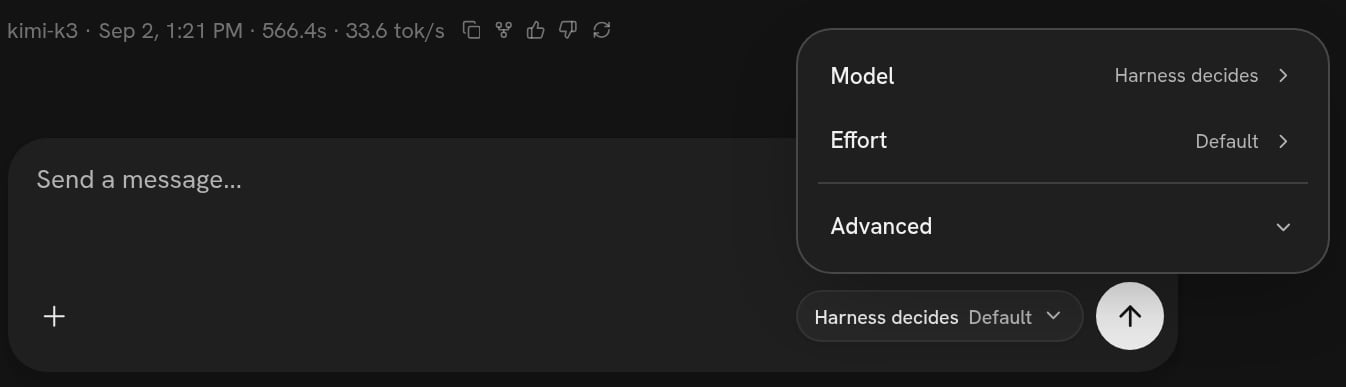 * **Model** — *Harness decides* means whatever your agent declares. Pick one and
it overrides the harness for this chat.
* **Effort** — how hard the model thinks before it answers, on a ladder of Off,
Low, Medium, High and Max.
* **Advanced → Endpoint** — whose credential answers: the platform's, or one of
your own from [Connections](/app/connections).
The choice is per chat, but a new chat starts on the last model you picked, so
put it back to *Harness decides* when you are done experimenting. Nothing about
this touches your harness, and nothing about it is permanent.
Under the answer is the footer, which says which model actually ran:
```text theme={null}
kimi-k3 · Sep 2, 1:21 PM · 566.4s · 33.6 tok/s
```
### As a rule, every time
```text theme={null}
When I am only chatting, use a cheaper model; keep the expensive one for
anything that touches code.
```
That is a rule, so it goes in the harness. The agent edits the file that answers
"which model, this turn" — one of the points of the run loop it can take over —
and the rule is asked again on every single turn rather than read once. The
starter ships that file doing nothing at all, with the shape written into its own
docstring:
```python theme={null}
if t.turn <= 3:
return {"model": "theo-spark-1.1", "provider": "splox"}
```
A rule like this is worth being concrete about. "Cheaper when chatting" needs a
test the code can apply — the turn number, whether the message mentions a file,
whether any tool has been called yet — and if you do not supply one the agent will
invent one. Ask what test it used.
## "Check your work before you answer"
```text theme={null}
Before you tell me something is done, have the Executor check it and say what
it found.
```
Your agent can hand work to another agent and read the answer back in its own
code. The starter already declares two: an `Assistant` that talks to you and an
`Executor` it can hand a self-contained job to. Asking for review makes the
second one a reviewer.
The other shape is a rule at the point where the loop decides the turn is over:
that point can send the model back around with a follow-up instead of letting the
answer out. It is the right one when "check it" should apply to every answer
rather than to the ones the agent remembers to check.
Which you get depends on what you asked for, and it is worth asking which you
got, because they cost differently: a sub-agent review is a second run with its
own bill; a rule at the end of the turn is another pass of the same one.
## What it costs, and what it cannot do
**Every one of these is a run.** A prompt edit is a minute or two; a rule the
agent has to write and test is longer. The exposure is the same as any other ask:
the previous version is still in the list.
**A prompt is not a guarantee.** "Never delete anything" in a prompt is a strong
suggestion, not a lock. If you need it to be a lock, ask for it as a rule at the
point where tool calls are approved — that point sees every call by name with its
arguments before it runs and can refuse it. Say which one you want: "I want this
enforced, not just asked for" is a sentence the agent understands.
**Some things are per chat and cannot be a rule.** The model chip and the effort
setting are conversation-level overrides. If you want them every time, they have
to be in the harness.
## How to check a rule actually fired
The answer being different is the first check. The second is that every run keeps
a record of which of your rules ran and what each decided:
```text theme={null}
hook.called {"hook": "context.build", "source": "programs/splox/hooks/context.py", "decision": "answered", "duration_ms": 12}
hook.called {"hook": "model.choose", "source": "programs/splox/hooks/model.py", "decision": "use_default", "duration_ms": 14}
hook.called {"hook": "stop.done", "source": "programs/splox/hooks/stop.py", "decision": "use_default", "duration_ms": 17}
hook.called {"hook": "tools.before", "source": "programs/splox/hooks/tools.py", "decision": "use_default", "duration_ms": 9}
```
That is from a real run on the account this page was written from, before any
model rule existed. `use_default` means the file was reached and chose not to
decide — which is exactly what a rule that is not firing looks like, and exactly
what a rule with a typo in it looks like too.
A rule that raises does not stop the run. The platform's own answer runs in its
place and the turn continues, which is what you want in production and precisely
what hides a mistake while somebody is writing one. So "it didn't work" is a real
possibility even when nothing looked wrong, and the way to settle it is to ask:
"did your model rule actually run on that turn?" The agent has a tool that reads
the run's journal and answers it point by point.
The third check is the version list: a rule that is not in it was not published,
so it is not there in a new chat. See [Versions](/inside/versions).
## Undoing
| What you want | What to say |
| ------------------------------------- | ----------------------------------------------------------------------------------------- |
| Back to how it answered before | "Go back to how you were answering last week." The agent finds the change and reverts it. |
| That one rule gone | "Take out the model rule." One file, one version. |
| All of it gone | "Put yourself back to version 6." |
| Just this conversation back to normal | Set the composer chip to *Harness decides · Default*. |
If the agent has become bad enough that asking it to fix itself is not working —
it will not stop apologising, or it now refuses ordinary work — do not keep
asking. Pin the machine to an older version instead:
[When it goes wrong](/inside/when-it-goes-wrong).
What the models on this platform are good at, and what effort changes.
The ten points of a turn, exactly. Hand your agent this URL when you want a
rule at a specific point.
* **Model** — *Harness decides* means whatever your agent declares. Pick one and
it overrides the harness for this chat.
* **Effort** — how hard the model thinks before it answers, on a ladder of Off,
Low, Medium, High and Max.
* **Advanced → Endpoint** — whose credential answers: the platform's, or one of
your own from [Connections](/app/connections).
The choice is per chat, but a new chat starts on the last model you picked, so
put it back to *Harness decides* when you are done experimenting. Nothing about
this touches your harness, and nothing about it is permanent.
Under the answer is the footer, which says which model actually ran:
```text theme={null}
kimi-k3 · Sep 2, 1:21 PM · 566.4s · 33.6 tok/s
```
### As a rule, every time
```text theme={null}
When I am only chatting, use a cheaper model; keep the expensive one for
anything that touches code.
```
That is a rule, so it goes in the harness. The agent edits the file that answers
"which model, this turn" — one of the points of the run loop it can take over —
and the rule is asked again on every single turn rather than read once. The
starter ships that file doing nothing at all, with the shape written into its own
docstring:
```python theme={null}
if t.turn <= 3:
return {"model": "theo-spark-1.1", "provider": "splox"}
```
A rule like this is worth being concrete about. "Cheaper when chatting" needs a
test the code can apply — the turn number, whether the message mentions a file,
whether any tool has been called yet — and if you do not supply one the agent will
invent one. Ask what test it used.
## "Check your work before you answer"
```text theme={null}
Before you tell me something is done, have the Executor check it and say what
it found.
```
Your agent can hand work to another agent and read the answer back in its own
code. The starter already declares two: an `Assistant` that talks to you and an
`Executor` it can hand a self-contained job to. Asking for review makes the
second one a reviewer.
The other shape is a rule at the point where the loop decides the turn is over:
that point can send the model back around with a follow-up instead of letting the
answer out. It is the right one when "check it" should apply to every answer
rather than to the ones the agent remembers to check.
Which you get depends on what you asked for, and it is worth asking which you
got, because they cost differently: a sub-agent review is a second run with its
own bill; a rule at the end of the turn is another pass of the same one.
## What it costs, and what it cannot do
**Every one of these is a run.** A prompt edit is a minute or two; a rule the
agent has to write and test is longer. The exposure is the same as any other ask:
the previous version is still in the list.
**A prompt is not a guarantee.** "Never delete anything" in a prompt is a strong
suggestion, not a lock. If you need it to be a lock, ask for it as a rule at the
point where tool calls are approved — that point sees every call by name with its
arguments before it runs and can refuse it. Say which one you want: "I want this
enforced, not just asked for" is a sentence the agent understands.
**Some things are per chat and cannot be a rule.** The model chip and the effort
setting are conversation-level overrides. If you want them every time, they have
to be in the harness.
## How to check a rule actually fired
The answer being different is the first check. The second is that every run keeps
a record of which of your rules ran and what each decided:
```text theme={null}
hook.called {"hook": "context.build", "source": "programs/splox/hooks/context.py", "decision": "answered", "duration_ms": 12}
hook.called {"hook": "model.choose", "source": "programs/splox/hooks/model.py", "decision": "use_default", "duration_ms": 14}
hook.called {"hook": "stop.done", "source": "programs/splox/hooks/stop.py", "decision": "use_default", "duration_ms": 17}
hook.called {"hook": "tools.before", "source": "programs/splox/hooks/tools.py", "decision": "use_default", "duration_ms": 9}
```
That is from a real run on the account this page was written from, before any
model rule existed. `use_default` means the file was reached and chose not to
decide — which is exactly what a rule that is not firing looks like, and exactly
what a rule with a typo in it looks like too.
A rule that raises does not stop the run. The platform's own answer runs in its
place and the turn continues, which is what you want in production and precisely
what hides a mistake while somebody is writing one. So "it didn't work" is a real
possibility even when nothing looked wrong, and the way to settle it is to ask:
"did your model rule actually run on that turn?" The agent has a tool that reads
the run's journal and answers it point by point.
The third check is the version list: a rule that is not in it was not published,
so it is not there in a new chat. See [Versions](/inside/versions).
## Undoing
| What you want | What to say |
| ------------------------------------- | ----------------------------------------------------------------------------------------- |
| Back to how it answered before | "Go back to how you were answering last week." The agent finds the change and reverts it. |
| That one rule gone | "Take out the model rule." One file, one version. |
| All of it gone | "Put yourself back to version 6." |
| Just this conversation back to normal | Set the composer chip to *Harness decides · Default*. |
If the agent has become bad enough that asking it to fix itself is not working —
it will not stop apologising, or it now refuses ordinary work — do not keep
asking. Pin the machine to an older version instead:
[When it goes wrong](/inside/when-it-goes-wrong).
What the models on this platform are good at, and what effort changes.
The ten points of a turn, exactly. Hand your agent this URL when you want a
rule at a specific point.