> ## Documentation Index
> Fetch the complete documentation index at: https://docs.splox.io/llms.txt
> Use this file to discover all available pages before exploring further.
# Usage
> The 5-hour and weekly windows: what they measure, how to read them, and when they free up
Your plan holds two rolling windows — five hours and a week — and between them
they are the whole of what a subscription grants. The first bounds a burst; the
second bounds living at that burst indefinitely. **Usage & billing** in settings
shows how full each one is.
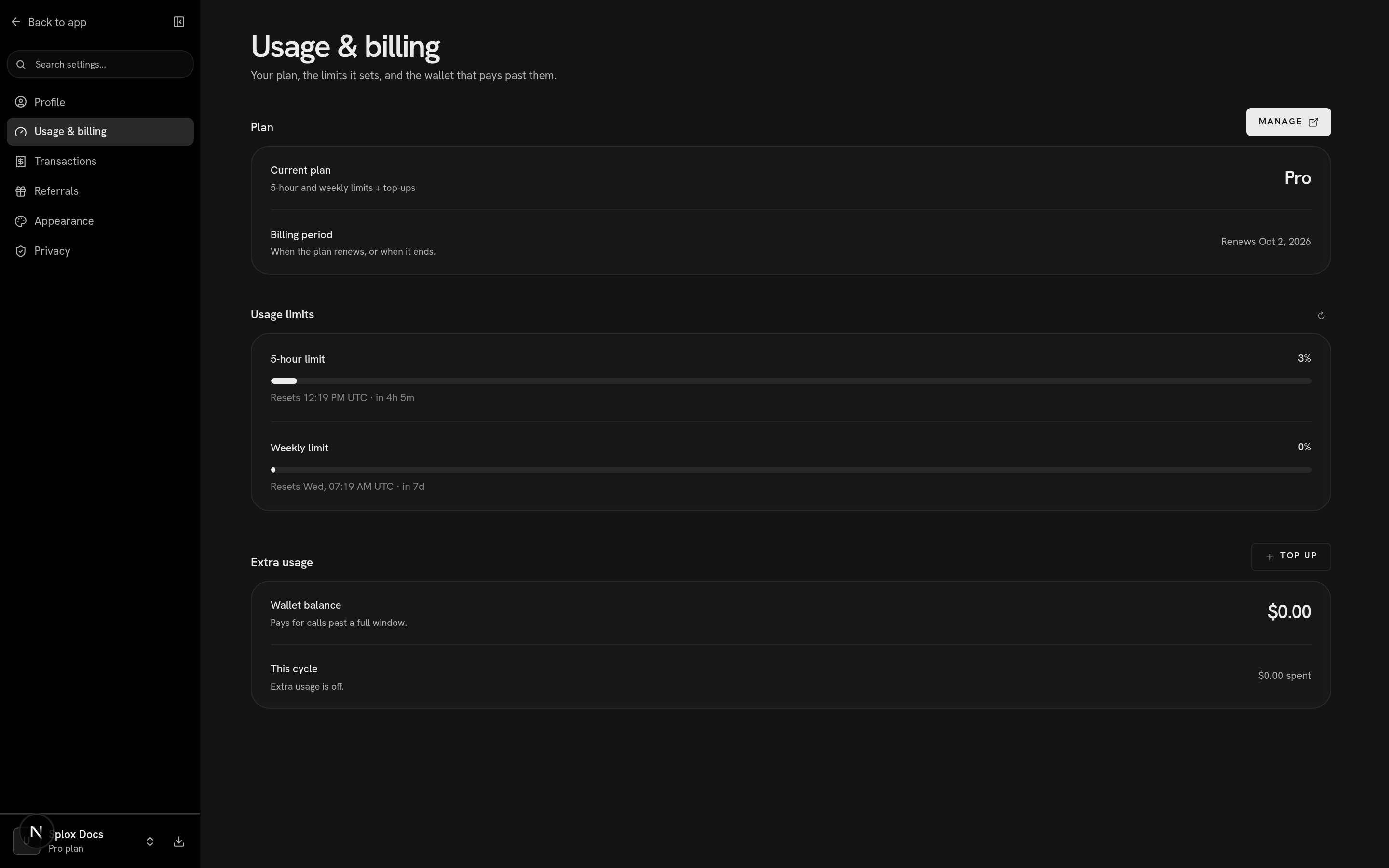 The same numbers come back from the app's own API, and this is the account in
the screenshot above:
```bash theme={null}
curl -s "$SPLOX_BASE_URL/v1/subscriptions/me" \
-H "Authorization: Bearer $SPLOX_API_KEY"
```
```json theme={null}
{
"plan": {"slug": "pro", "name": "Pro", "machine_limit": 1, "machines_persistent": true},
"subscription": {
"interval": "month", "source": "stripe", "status": "active",
"current_period_start": "2026-09-02T08:07:32.272134Z",
"current_period_end": "2026-10-02T08:07:32.272134Z",
"cancel_at_period_end": false
},
"quota": {
"windows": [
{"kind": "5h", "status": "allowed", "used_percent": 2.5370757676585227, "window_seconds": 18000,
"resets_at": "2026-09-02T12:19:14Z", "resets_in_seconds": 14956},
{"kind": "week", "status": "allowed", "used_percent": 0.38056226961277123, "window_seconds": 604800,
"resets_at": "2026-09-09T07:19:14Z", "resets_in_seconds": 601756}
],
"extra": {"enabled": false, "spent_micro_usd_this_cycle": 0, "wallet_micro_usd": 0},
"mode": "plan"
}
}
```
Trimmed: the `plan` and `subscription` objects also carry their ids, the Stripe
price ids and timestamps.
`GET /v1/billing/balance` returns the `quota` object on its own, if that is all
you want.
## What a window measures
Every call the platform pays for on your behalf — a model generating tokens, a
tool doing work — is priced when it finishes and written to a ledger as one row.
The window is the sum of those rows inside it, as a percentage of the cap your
plan sets.
Two consequences worth knowing:
* **The unit is money, not messages.** A long turn on an expensive model moves
the bar further than a short one on a cheap model. There is no message count
to budget against.
* **A call on your own key does not count.** A model reached through a
connection you added is paid by you to your provider. It is recorded for the
usage graphs and nothing else — no ledger row, no window.
The caps themselves are not published: the plans endpoint deliberately omits
them, and what the product tells you instead is the percentage. See
[Plans](/account/plans) for how the tiers compare.
## The windows are fixed, not sliding
A window is not a trailing sum over the last five hours. The first call opens a
window, that window ends exactly five hours later, and at that moment the whole
allowance comes back at once. Inside a window the percentage only ever climbs.
`resets_at` is that moment, and it means exactly one thing everywhere it
appears: when `used_percent` next goes down. `resets_in_seconds` is the same
wait as a countdown, computed on the server's clock — the app never subtracts
timestamps itself, which is why the reset line agrees with the refusal that
produced it.
When a window is not open at all — nothing has been spent since the last one
ended — the reset fields are absent. Nothing is being held against you, and the
honest line is no line.
## Reading a row
Each row is one window: its name, how full it is, the bar, and when it frees up.
| On screen | What it is |
| -------------------------------- | ----------------------------------------------------------------------------- |
| `5-hour limit`, `Weekly limit` | derived from `window_seconds` (18000, 604800), not from the `kind` string |
| `3%` | `used_percent`, rounded — and capped at 100 for display |
| the bar | the same number as a fill |
| `Resets 12:19 PM UTC · in 4h 5m` | `resets_at` as a fixed moment, then `resets_in_seconds` as a countdown |
| `No limit` | this plan sets no cap for this window, so the server reports no window at all |
| `Usage unavailable` | the read failed — see below |
The refresh control at the right of **Usage limits** re-reads
`/v1/subscriptions/me` rather than waiting for the next poll.
## The three statuses
| `status` | What it means |
| --------- | -------------------------------------------------------------------------------------------------------------------------------------------------------------------------------------------------------- |
| `allowed` | The window has room. Calls are funded by the plan. |
| `limited` | `used >= cap`. The plan will not fund another call inside this window. What happens next is on [Limits](/account/limits). |
| `unknown` | The usage read failed. This status carries **no numbers at all** — no `used_percent`, no reset — and renders as `Usage unavailable` rather than 0%, because showing 0% would claim room nobody verified. |
`used_percent` is not clamped on the wire. Admission does not reserve an
estimate against the cap, so you get the whole cap and the last admitted call
can carry you slightly past it: `103.4` is a real value and means the window
went 3.4% over. The screen caps the display at 100% — a person is never shown
more than a full window — but a client reading the API sees the overshoot.
## `mode`: what would fund the next call
`plan` — neither window is full.
`extra` — the windows are full and the wallet can pay. See
[Extra usage](/account/extra-usage).
`blocked` — the windows are full and there is nothing behind them. The next
call is refused.
This is the same field the admission gate sets, and the account screen and a
refusal read it from the same computation, so the two surfaces cannot describe
your allowance differently.
## When it frees up
Wait for `resets_at`, and the whole window is yours again — there is no gradual
thaw. Two other things change the picture:
* **Moving up a plan** raises the cap immediately. What you have already spent
is frozen in the ledger; the number it is measured against is the new plan's,
so a window that read 100% reads a fraction of that as soon as the
subscription is active.
* **Money in the wallet** does not raise the cap, but it does pay for calls past
a full window, at list prices. That is what `mode: "extra"` is.
The 429, the message in a chat, and what does not lift it.
The wallet, and when it is used instead of the plan.
The same numbers come back from the app's own API, and this is the account in
the screenshot above:
```bash theme={null}
curl -s "$SPLOX_BASE_URL/v1/subscriptions/me" \
-H "Authorization: Bearer $SPLOX_API_KEY"
```
```json theme={null}
{
"plan": {"slug": "pro", "name": "Pro", "machine_limit": 1, "machines_persistent": true},
"subscription": {
"interval": "month", "source": "stripe", "status": "active",
"current_period_start": "2026-09-02T08:07:32.272134Z",
"current_period_end": "2026-10-02T08:07:32.272134Z",
"cancel_at_period_end": false
},
"quota": {
"windows": [
{"kind": "5h", "status": "allowed", "used_percent": 2.5370757676585227, "window_seconds": 18000,
"resets_at": "2026-09-02T12:19:14Z", "resets_in_seconds": 14956},
{"kind": "week", "status": "allowed", "used_percent": 0.38056226961277123, "window_seconds": 604800,
"resets_at": "2026-09-09T07:19:14Z", "resets_in_seconds": 601756}
],
"extra": {"enabled": false, "spent_micro_usd_this_cycle": 0, "wallet_micro_usd": 0},
"mode": "plan"
}
}
```
Trimmed: the `plan` and `subscription` objects also carry their ids, the Stripe
price ids and timestamps.
`GET /v1/billing/balance` returns the `quota` object on its own, if that is all
you want.
## What a window measures
Every call the platform pays for on your behalf — a model generating tokens, a
tool doing work — is priced when it finishes and written to a ledger as one row.
The window is the sum of those rows inside it, as a percentage of the cap your
plan sets.
Two consequences worth knowing:
* **The unit is money, not messages.** A long turn on an expensive model moves
the bar further than a short one on a cheap model. There is no message count
to budget against.
* **A call on your own key does not count.** A model reached through a
connection you added is paid by you to your provider. It is recorded for the
usage graphs and nothing else — no ledger row, no window.
The caps themselves are not published: the plans endpoint deliberately omits
them, and what the product tells you instead is the percentage. See
[Plans](/account/plans) for how the tiers compare.
## The windows are fixed, not sliding
A window is not a trailing sum over the last five hours. The first call opens a
window, that window ends exactly five hours later, and at that moment the whole
allowance comes back at once. Inside a window the percentage only ever climbs.
`resets_at` is that moment, and it means exactly one thing everywhere it
appears: when `used_percent` next goes down. `resets_in_seconds` is the same
wait as a countdown, computed on the server's clock — the app never subtracts
timestamps itself, which is why the reset line agrees with the refusal that
produced it.
When a window is not open at all — nothing has been spent since the last one
ended — the reset fields are absent. Nothing is being held against you, and the
honest line is no line.
## Reading a row
Each row is one window: its name, how full it is, the bar, and when it frees up.
| On screen | What it is |
| -------------------------------- | ----------------------------------------------------------------------------- |
| `5-hour limit`, `Weekly limit` | derived from `window_seconds` (18000, 604800), not from the `kind` string |
| `3%` | `used_percent`, rounded — and capped at 100 for display |
| the bar | the same number as a fill |
| `Resets 12:19 PM UTC · in 4h 5m` | `resets_at` as a fixed moment, then `resets_in_seconds` as a countdown |
| `No limit` | this plan sets no cap for this window, so the server reports no window at all |
| `Usage unavailable` | the read failed — see below |
The refresh control at the right of **Usage limits** re-reads
`/v1/subscriptions/me` rather than waiting for the next poll.
## The three statuses
| `status` | What it means |
| --------- | -------------------------------------------------------------------------------------------------------------------------------------------------------------------------------------------------------- |
| `allowed` | The window has room. Calls are funded by the plan. |
| `limited` | `used >= cap`. The plan will not fund another call inside this window. What happens next is on [Limits](/account/limits). |
| `unknown` | The usage read failed. This status carries **no numbers at all** — no `used_percent`, no reset — and renders as `Usage unavailable` rather than 0%, because showing 0% would claim room nobody verified. |
`used_percent` is not clamped on the wire. Admission does not reserve an
estimate against the cap, so you get the whole cap and the last admitted call
can carry you slightly past it: `103.4` is a real value and means the window
went 3.4% over. The screen caps the display at 100% — a person is never shown
more than a full window — but a client reading the API sees the overshoot.
## `mode`: what would fund the next call
`plan` — neither window is full.
`extra` — the windows are full and the wallet can pay. See
[Extra usage](/account/extra-usage).
`blocked` — the windows are full and there is nothing behind them. The next
call is refused.
This is the same field the admission gate sets, and the account screen and a
refusal read it from the same computation, so the two surfaces cannot describe
your allowance differently.
## When it frees up
Wait for `resets_at`, and the whole window is yours again — there is no gradual
thaw. Two other things change the picture:
* **Moving up a plan** raises the cap immediately. What you have already spent
is frozen in the ledger; the number it is measured against is the new plan's,
so a window that read 100% reads a fraction of that as soon as the
subscription is active.
* **Money in the wallet** does not raise the cap, but it does pay for calls past
a full window, at list prices. That is what `mode: "extra"` is.
The 429, the message in a chat, and what does not lift it.
The wallet, and when it is used instead of the plan.